LinkedIn publishing kit
One post per memo: the image, a title, a caption and hashtags, ready to paste. The suggested order is the memo number. Each caption ends with the link to its runbook and to this repository.
| # | Post title | Image | Page |
|---|---|---|---|
| PG-01 | VM stuck in BUILD? Look at the network before you look at Nova. | pg-01-vm-stuck-in-build.png |
page |
| PG-02 | "No valid host": three places the request can stop | pg-02-no-valid-host.png |
page |
| PG-03 | "Exceeded maximum number of retries" tells you nothing. The computes do. | pg-03-max-retries-exceeded.png |
page |
| PG-04 | VM stuck in deleting: why deleting it again does nothing | pg-04-vm-stuck-in-deleting.png |
page |
| PG-05 | ACTIVE in Nova, frozen for the user: the silent full disk | pg-05-active-but-frozen.png |
page |
| PG-06 | "Compute down" does not mean the host is down | pg-06-compute-down-is-not-host-down.png |
page |
| PG-07 | Fence before you evacuate. Always. | pg-07-fence-before-evacuate.png |
page |
| PG-08 | Compute service: disabled and down are two different things | pg-08-disabled-or-down.png |
page |
| PG-09 | Emptying a compute host: one operation does not fit every instance | pg-09-emptying-a-host-for-maintenance.png |
page |
| PG-10 | ACTIVE, no fault, no IP address: Nova did its job | pg-10-active-but-no-ip.png |
page |
| PG-11 | Reachable from inside, not from outside: four checks, in order | pg-11-unreachable-from-outside.png |
page |
| PG-12 | Ping works, large transfers stall: test the largest packet | pg-12-ping-works-transfers-stall.png |
page |
| PG-13 | Volume stuck in attaching or detaching: four views, one truth | pg-13-volume-stuck-attaching-or-detaching.png |
page |
| PG-14 | A volume still in-use for an instance that no longer exists | pg-14-volume-in-use-by-a-missing-instance.png |
page |
| PG-15 | Control plane down is not the same as workloads down | pg-15-control-plane-down.png |
page |
| PG-16 | MessagingTimeout in every service: diagnose the bus before the services | pg-16-rpc-timeouts-everywhere.png |
page |
| PG-17 | Galera lost quorum: the data is at risk during the recovery, not before | pg-17-galera-lost-quorum.png |
page |
| PG-18 | Restarting libvirt or the OVS agent: will the instances survive? | pg-18-before-restarting-an-agent.png |
page |
| PG-19 | A VM creation failed. Follow one request id, not the timestamps. | pg-19-trace-one-request.png |
page |
| PG-20 | Stale records: project tools first, the database last | pg-20-cleaning-up-stale-records.png |
page |
| PG-21 | An instance went SHUTOFF by itself. Nova did not stop it: the kernel did. | pg-21-shutoff-by-itself.png |
page |
| PG-22 | VERIFY_RESIZE is not a stuck state. It is a pending decision. | pg-22-resize-not-finished.png |
page |
| PG-23 | A live migration that never completes: watch one number | pg-23-live-migration-never-completes.png |
page |
| PG-24 | Every instance on one compute lost its network. Nova says ACTIVE. | pg-24-whole-compute-lost-network.png |
page |
| PG-25 | A security group rule that changes nothing: four things to check | pg-25-security-group-rule-has-no-effect.png |
page |
| PG-26 | 503 from the API: HAProxy is the messenger, not the cause | pg-26-api-returns-503.png |
page |
| PG-27 | 401 with a token that should be valid: the fresh token is lying to you | pg-27-401-with-a-valid-token.png |
page |
| PG-28 | "Too many connections": three limits, three messages | pg-28-database-connections-exhausted.png |
page |
| PG-29 | A snapshot that never finishes: find where it is before you clear it | pg-29-snapshot-never-finishes.png |
page |
| PG-30 | The guest is broken, Nova says ACTIVE: rescue mode | pg-30-guest-broken-nova-says-active.png |
page |
| PG-31 | The instance console does not open: four hops, two places to look | pg-31-console-does-not-open.png |
page |
| PG-32 | Boot from volume fails: Nova reports it, Cinder explains it | pg-32-boot-from-volume-fails.png |
page |
| PG-33 | Flavor's disk is too small: the file size is not the disk size | pg-33-image-too-big-for-the-flavor.png |
page |
| PG-34 | Steal time on pinned CPUs: live migration is not the fix | pg-34-steal-time-on-pinned-cpus.png |
page |
| PG-35 | After a compute reboot, the instances stay SHUTOFF. That is the default. | pg-35-after-a-compute-reboot.png |
page |
| PG-36 | A compute was renamed. Now nova-compute refuses to start. | pg-36-compute-renamed-or-re-added.png |
page |
| PG-37 | ACTIVE, with an address, and no SSH key: the instance booted without metadata | pg-37-booted-without-its-ssh-key.png |
page |
| PG-38 | "Binding failed for port": start with the Neutron server log | pg-38-binding-failed-for-port.png |
page |
| PG-39 | The volume was extended. The guest still sees the old size. | pg-39-extended-but-same-size-inside.png |
page |
| PG-40 | Volume stuck in creating: one field tells the scheduler from the backend | pg-40-volume-stuck-in-creating.png |
page |
| PG-41 | A volume that will not delete may still be in use | pg-41-volume-will-not-delete.png |
page |
| PG-42 | nova-conductor down: every compute looks dead, and none of them is | pg-42-conductor-or-scheduler-down.png |
page |
| PG-43 | VM creation fails everywhere: the cause is rarely in Nova | pg-43-provisioning-fails-everywhere.png |
page |
| PG-44 | The logs of one host do not line up: check its clock before your theory | pg-44-logs-do-not-line-up.png |
page |
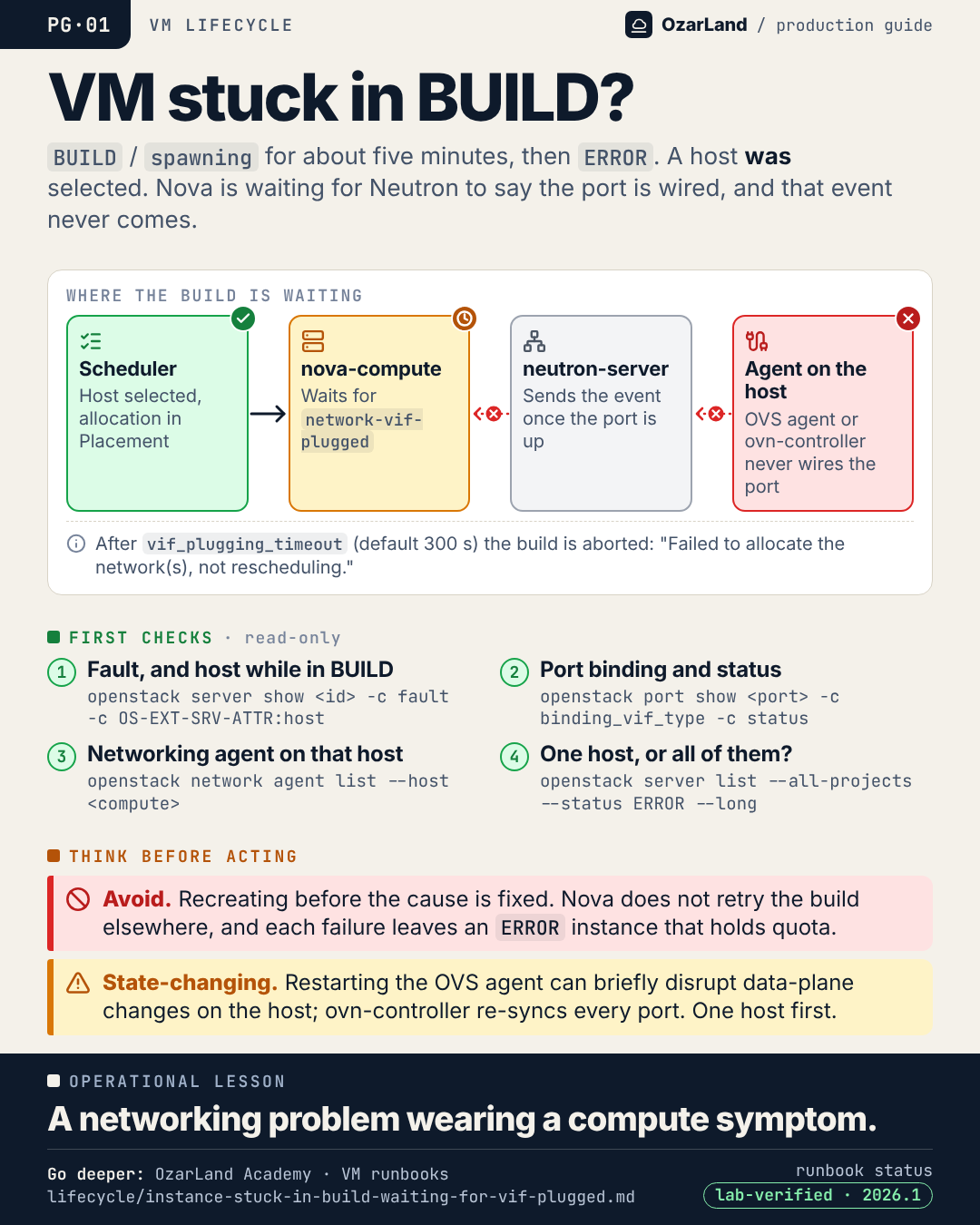
PG-01 · VM stuck in BUILD? Look at the network before you look at Nova.
Image: dist/pg-01-vm-stuck-in-build.png
An instance sits in BUILD / spawning for five minutes, then goes to ERROR.

The reflex is to blame Nova. But scheduling already succeeded: a host was selected and Placement holds the allocation. nova-compute is waiting for one event from Neutron, network-vif-plugged, and it never arrives.

Three read-only checks tell you where it stopped:
→ the fault and the selected host
→ the port: binding_failed, or bound but DOWN?
→ the networking agent on that host

Deleting and recreating will not help while the agent on the host is not wiring ports.

The lesson: a networking problem wearing a compute symptom.

Runbook: https://github.com/OzarLand/ozarland-academy/blob/main/docs/runbooks/lifecycle/instance-stuck-in-build-waiting-for-vif-plugged.md
More memos: https://github.com/OzarLand/ozarland-academy/tree/main/docs/production

#OpenStack #Nova #Neutron #CloudOperations #SRE #OzarLand
PG-02 · "No valid host": three places the request can stop
Image: dist/pg-02-no-valid-host.png
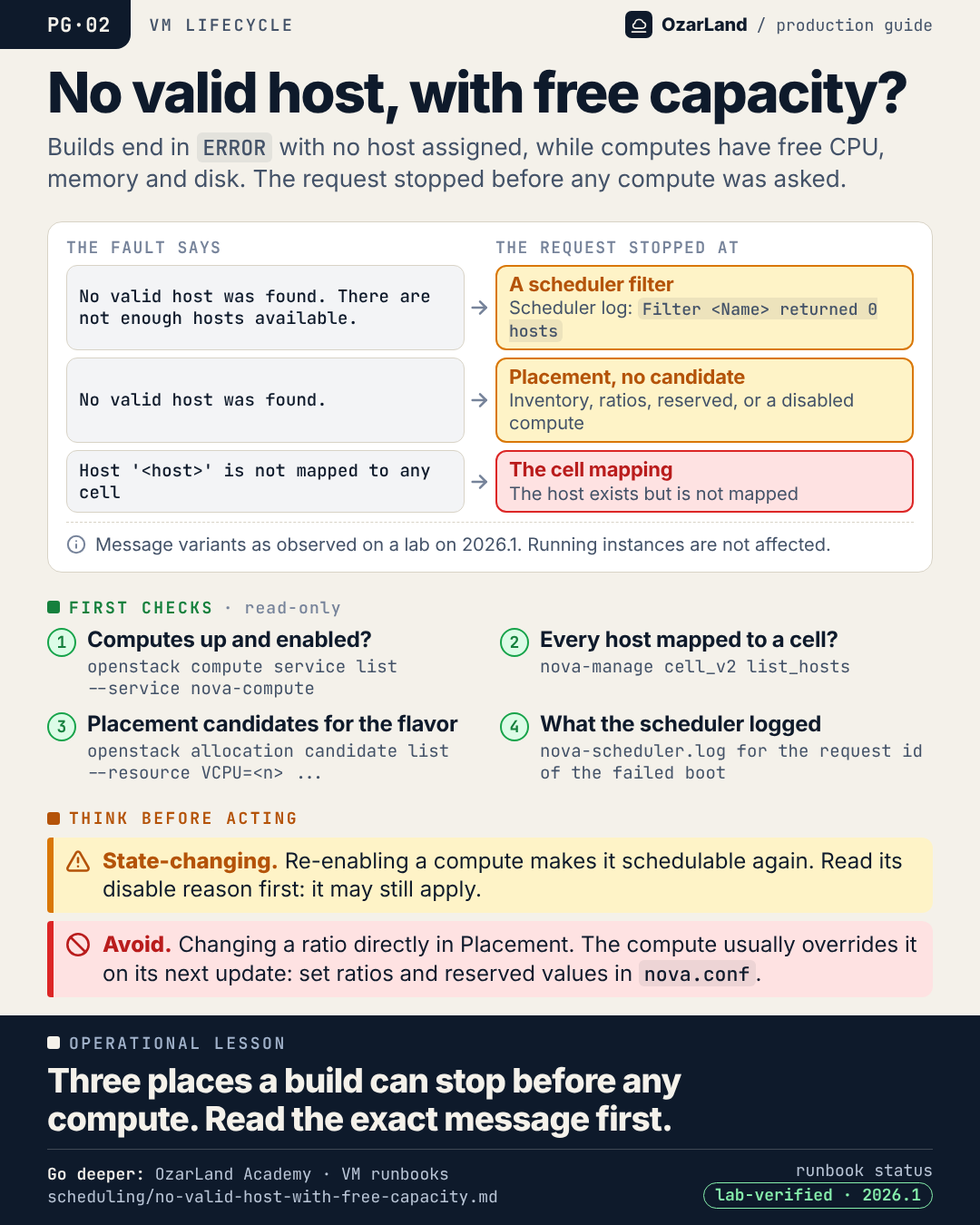
Capacity exists. Hypervisors have free CPU, memory and disk. And every build still ends with "No valid host was found".

Before opening a capacity ticket, read the exact message. It tells you where the request stopped:

→ "...There are not enough hosts available." A scheduler filter rejected every host. The scheduler log names it.
→ "No valid host was found." and nothing after: Placement returned no candidate. Look at inventory, allocation ratios, reserved values, disabled computes.
→ "Host '<host>' is not mapped to any cell": the compute exists but was never mapped. Classic after adding hosts.

Three places the request can stop. And the third message does not even say "No valid host".

Runbook: https://github.com/OzarLand/ozarland-academy/blob/main/docs/runbooks/scheduling/no-valid-host-with-free-capacity.md
More memos: https://github.com/OzarLand/ozarland-academy/tree/main/docs/production

#OpenStack #Nova #Placement #CloudOperations #SRE #OzarLand
PG-03 · "Exceeded maximum number of retries" tells you nothing. The computes do.
Image: dist/pg-03-max-retries-exceeded.png
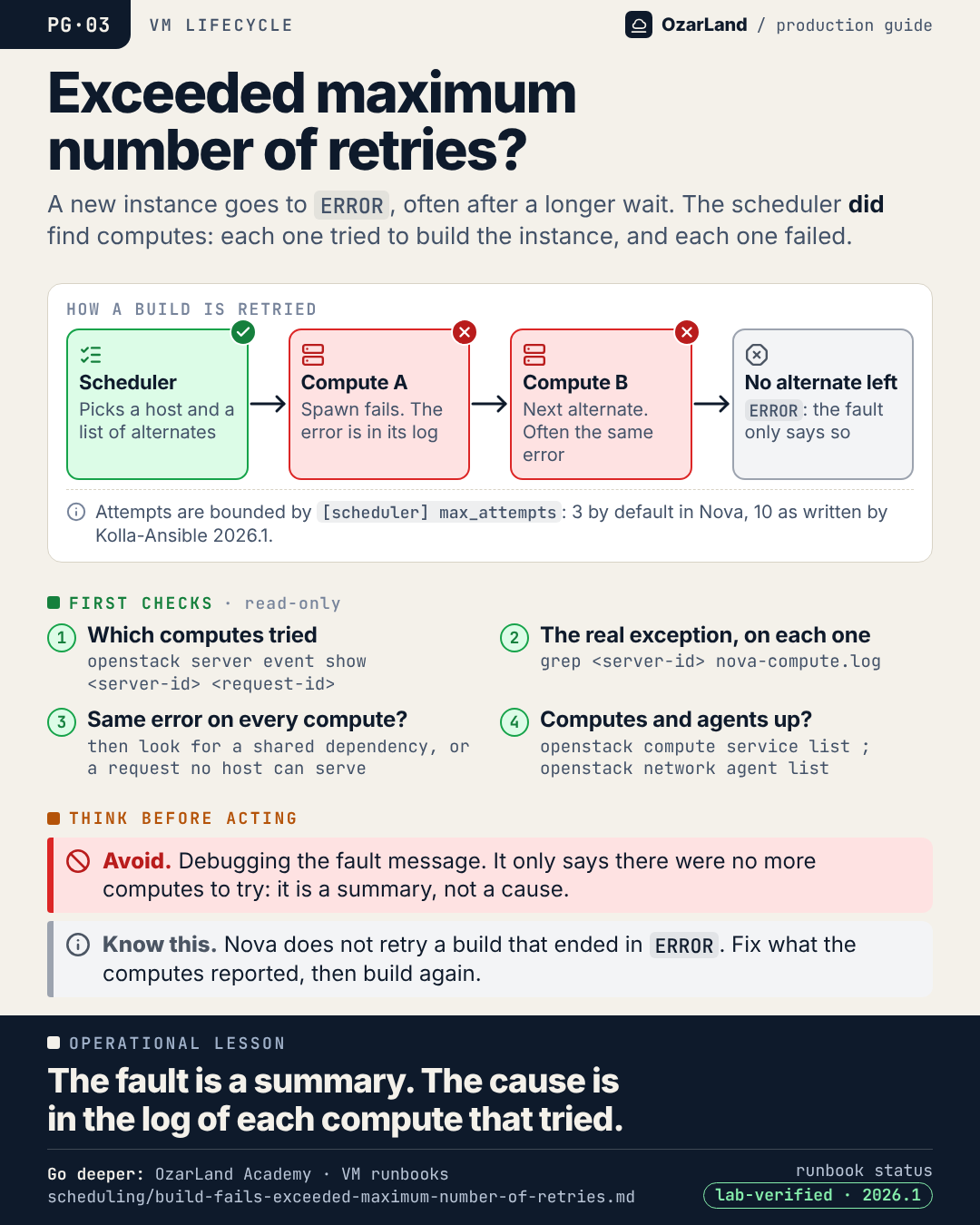
"Exceeded maximum number of retries. Exhausted all hosts available for retrying build failures."

This fault is not a scheduling failure. The scheduler found hosts. Each one tried to spawn the instance, failed, and Nova moved on to the next alternate until none was left.

So the message is a summary. The cause is the exception each compute logged. Three patterns:
→ one broken compute: builds succeed elsewhere, just slower
→ a shared dependency: every attempt fails the same way
→ a request no host can satisfy at spawn time

Start with the server's events, which name the computes that tried, then read nova-compute.log on each host that tried.

Runbook: https://github.com/OzarLand/ozarland-academy/blob/main/docs/runbooks/scheduling/build-fails-exceeded-maximum-number-of-retries.md
More memos: https://github.com/OzarLand/ozarland-academy/tree/main/docs/production

#OpenStack #Nova #Troubleshooting #CloudOperations #SRE #OzarLand
PG-04 · VM stuck in deleting: why deleting it again does nothing
Image: dist/pg-04-vm-stuck-in-deleting.png
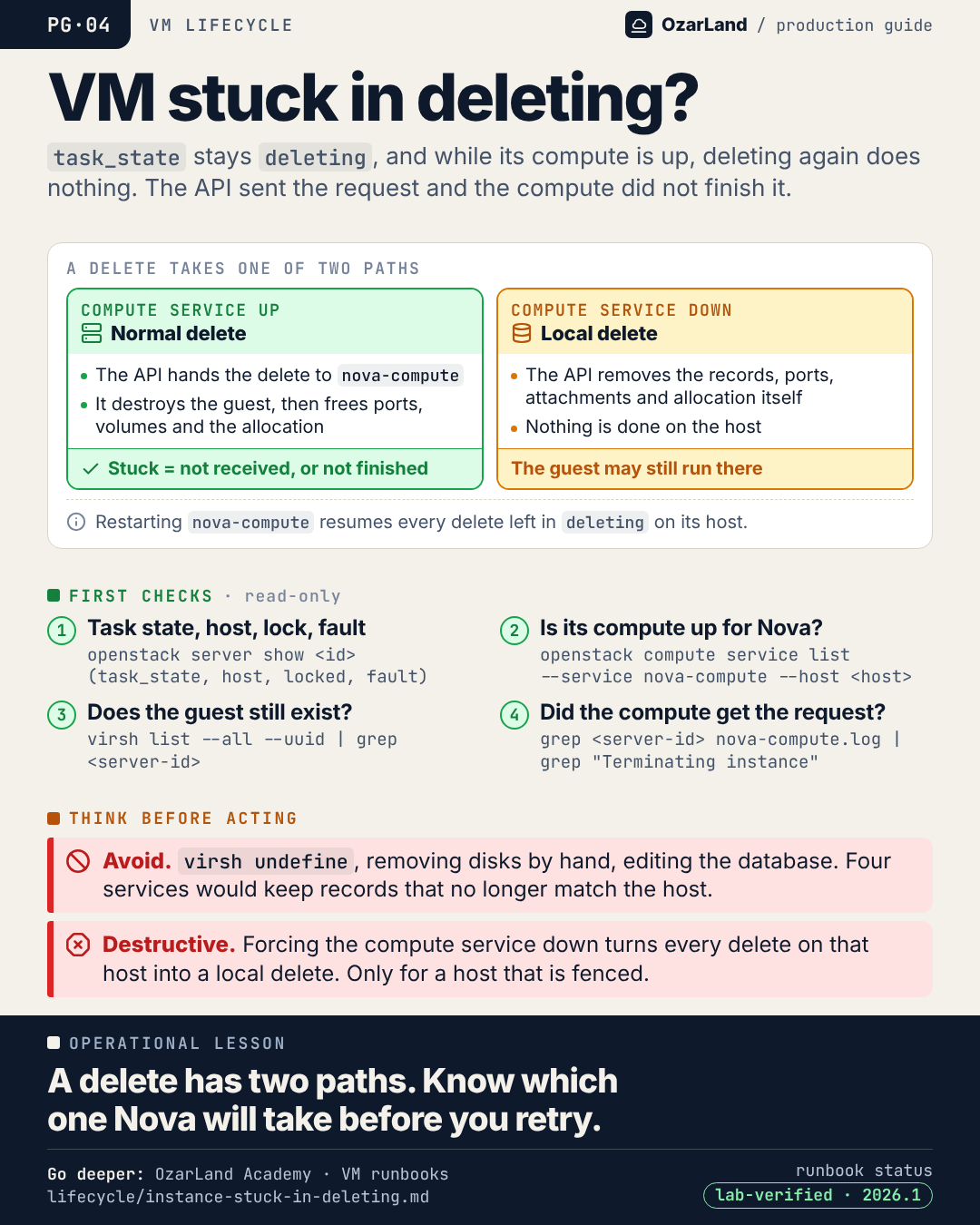
An instance stays in task_state "deleting". You run the delete again. Nothing changes.

That is by design: while the compute is up, Nova ignores a second delete for an instance already in deleting.

What matters is which of two paths the delete takes:
→ Compute service UP: the API hands the delete to nova-compute, which destroys the guest and frees ports, volumes and the allocation. Stuck means the compute never got the request, or never finished it.
→ Compute service DOWN: a local delete. The records go, nothing is done on the host. If that host is not really dead, the guest keeps running.

The shortcuts (virsh undefine, a database edit) leave four services with records that no longer match reality.

Runbook: https://github.com/OzarLand/ozarland-academy/blob/main/docs/runbooks/lifecycle/instance-stuck-in-deleting.md
More memos: https://github.com/OzarLand/ozarland-academy/tree/main/docs/production

#OpenStack #Nova #Troubleshooting #CloudOperations #SRE #OzarLand
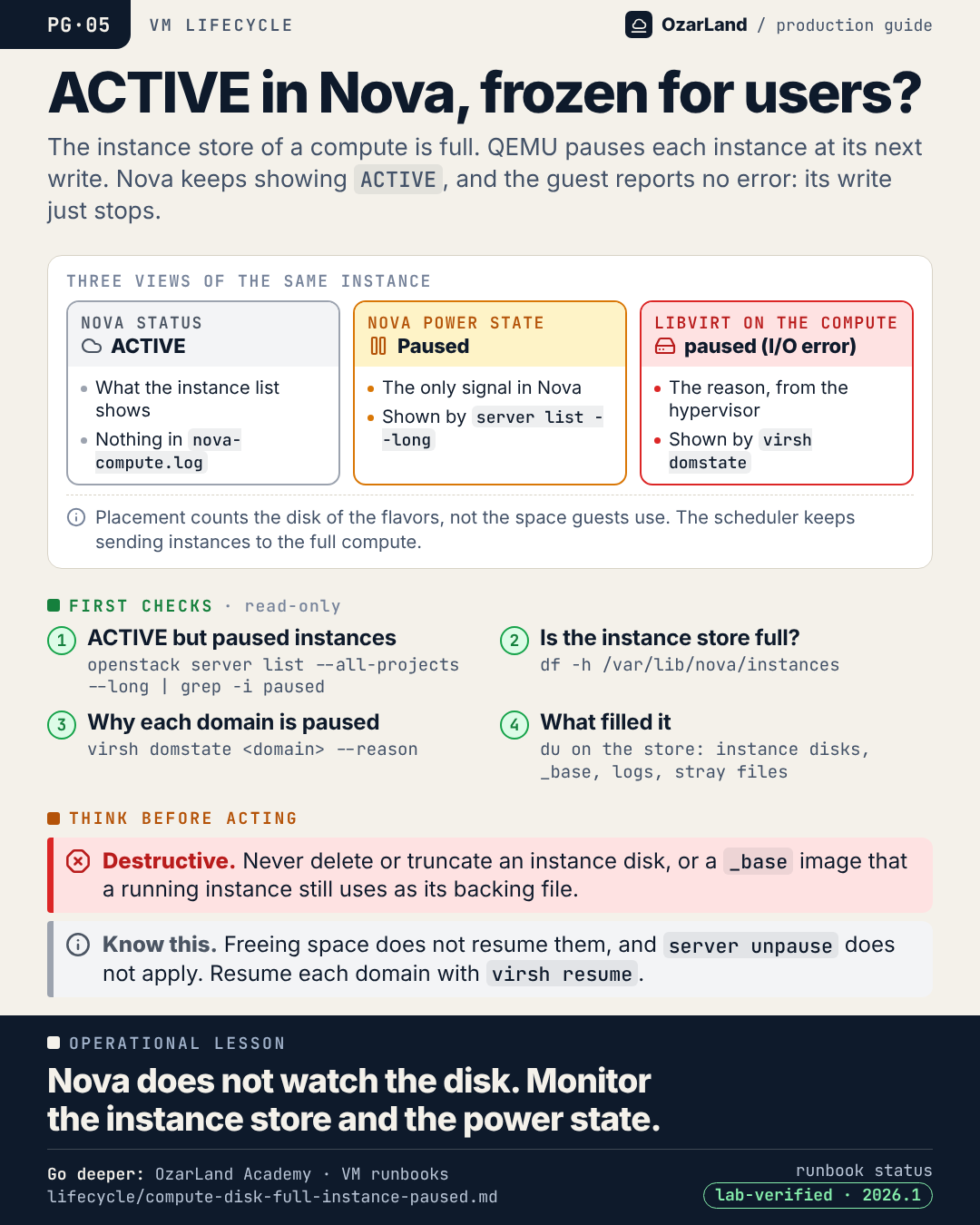
PG-05 · ACTIVE in Nova, frozen for the user: the silent full disk
Image: dist/pg-05-active-but-frozen.png
A user says their VM "hangs". Nova says ACTIVE. Nothing in the nova-compute log.

The compute's instance store is full. QEMU paused the instance on its next write, and it will wait there, losing nothing, until someone resumes it.

Three views of the same instance:
→ Nova status: ACTIVE
→ Nova power state: Paused (the only signal in Nova)
→ libvirt: paused (I/O error)

Placement does not help: it counts the disk of flavors, not the space guests actually use, so the scheduler keeps placing instances on the full host.

Freeing space is not enough. The domains stay paused until they are resumed.

Monitor the instance store, and alert on "ACTIVE but Paused".

Runbook: https://github.com/OzarLand/ozarland-academy/blob/main/docs/runbooks/lifecycle/compute-disk-full-instance-paused.md
More memos: https://github.com/OzarLand/ozarland-academy/tree/main/docs/production

#OpenStack #Nova #Libvirt #Monitoring #CloudOperations #OzarLand
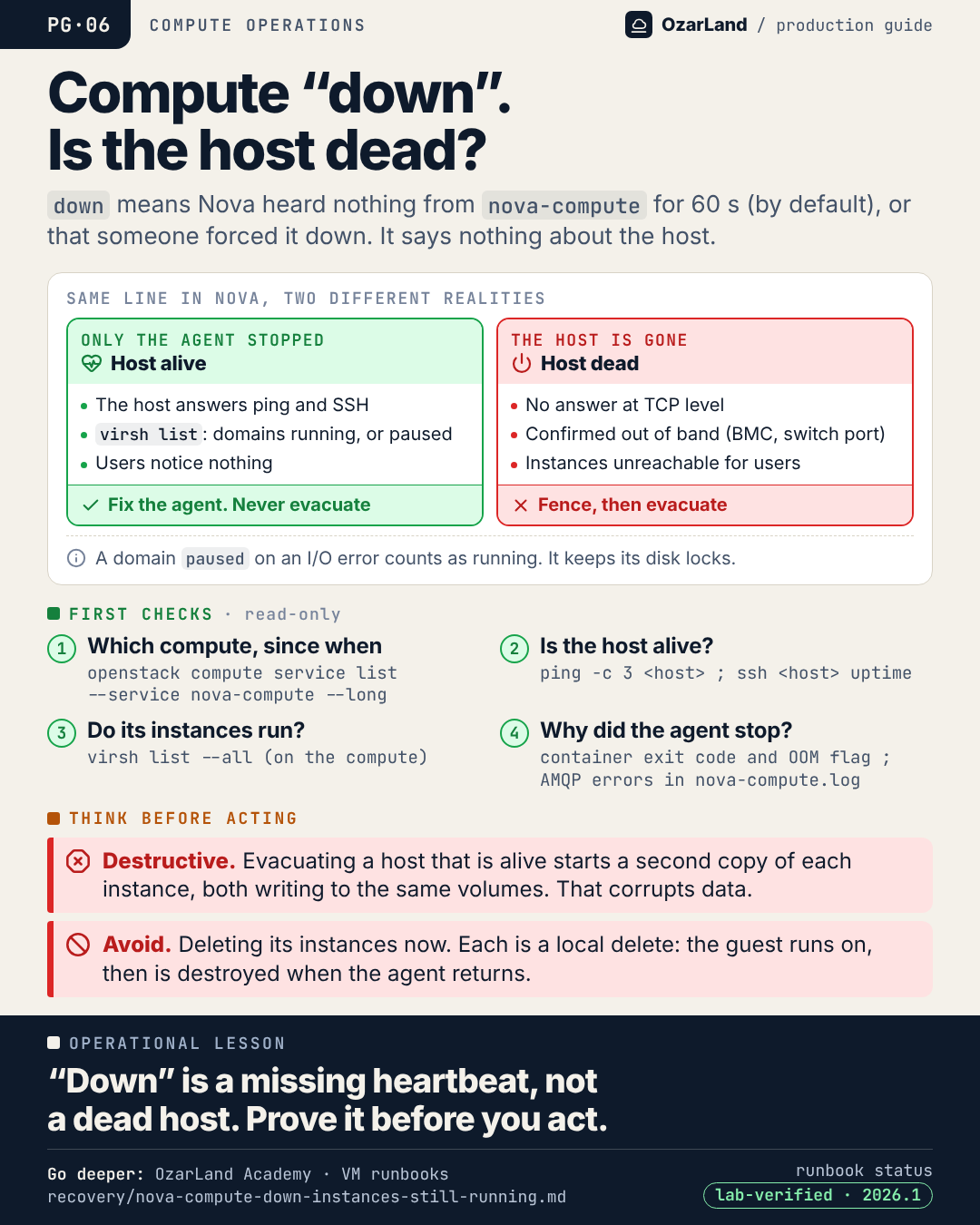
PG-06 · "Compute down" does not mean the host is down
Image: dist/pg-06-compute-down-is-not-host-down.png
openstack compute service list shows a compute "down". What does Nova actually know?

Only this: it has heard nothing from the nova-compute agent of that host for service_down_time, 60 seconds by default, unless someone forced the service down. Nothing about the host. Nothing about the instances.

When only the agent stopped, the hypervisor and the instances run on, and users notice nothing. The danger is the operator, or the automation, that treats it as a dead host: evacuating now starts a second copy of every instance, writing to the same volumes.

Before anything else:
→ does the host answer ping and SSH?
→ does virsh list show the domains running?

If yes: fix the agent. Never evacuate.

Runbook: https://github.com/OzarLand/ozarland-academy/blob/main/docs/runbooks/recovery/nova-compute-down-instances-still-running.md
More memos: https://github.com/OzarLand/ozarland-academy/tree/main/docs/production

#OpenStack #Nova #HighAvailability #CloudOperations #SRE #OzarLand
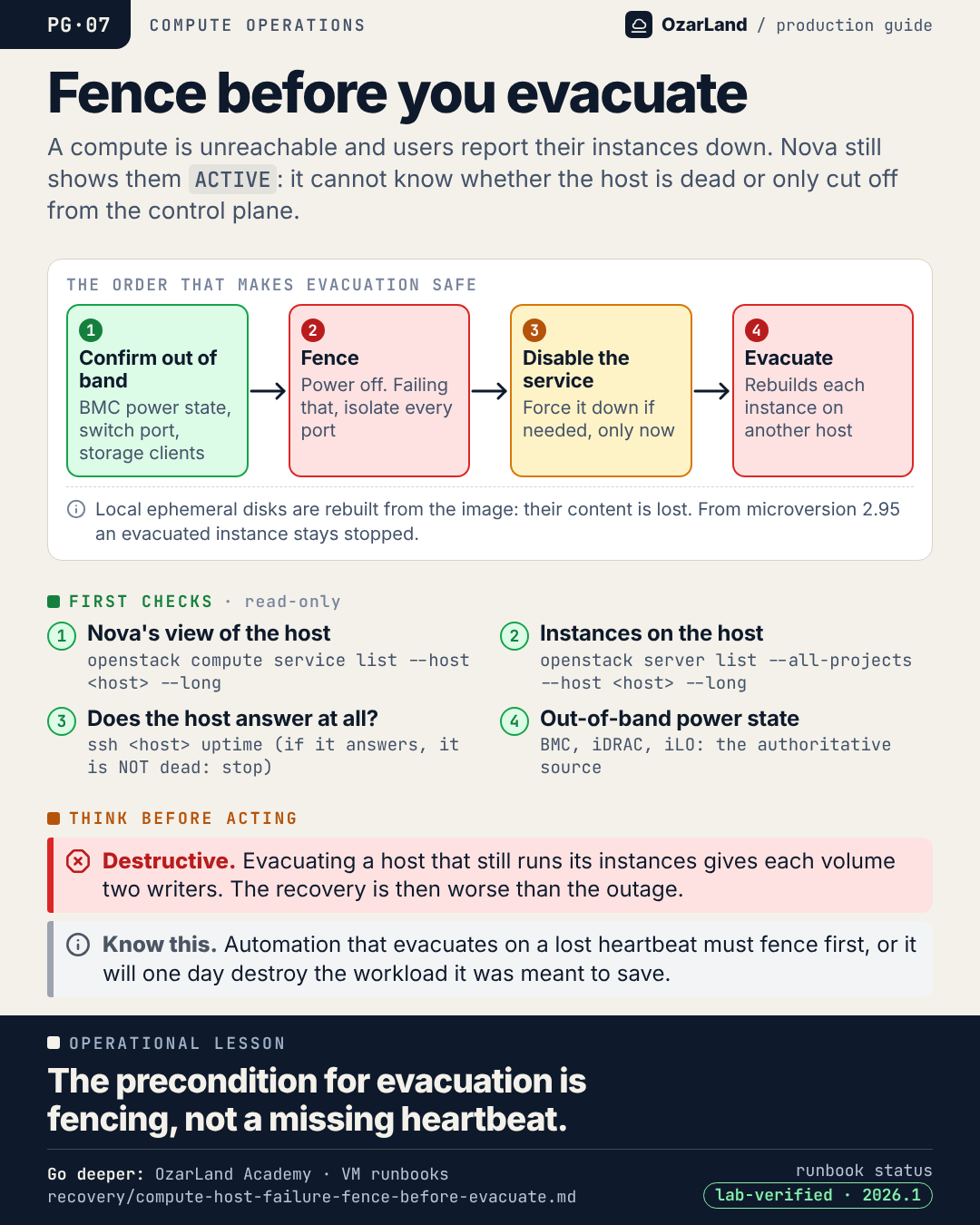
PG-07 · Fence before you evacuate. Always.
Image: dist/pg-07-fence-before-evacuate.png
A compute host stops answering. The instances on it are down. The pressure to run "server evacuate" is immediate.

But Nova cannot tell a dead host from an unreachable one. If the host is only cut off from the control plane, its instances may still be running, and still writing. Evacuate now and each volume gets two writers.

The order that makes it safe:
1. Confirm out of band (BMC, switch port, storage side)
2. Fence: power off, or failing that isolate every port
3. Disable the service, and force it down if needed, only now
4. Evacuate

The same goes for auto-evacuation tooling: if it reacts to a lost heartbeat without fencing, it will one day destroy the workload it was meant to save.

The precondition for evacuation is fencing, not a missing heartbeat.

Runbook: https://github.com/OzarLand/ozarland-academy/blob/main/docs/runbooks/recovery/compute-host-failure-fence-before-evacuate.md
More memos: https://github.com/OzarLand/ozarland-academy/tree/main/docs/production

#OpenStack #Nova #HighAvailability #DisasterRecovery #CloudOperations #OzarLand
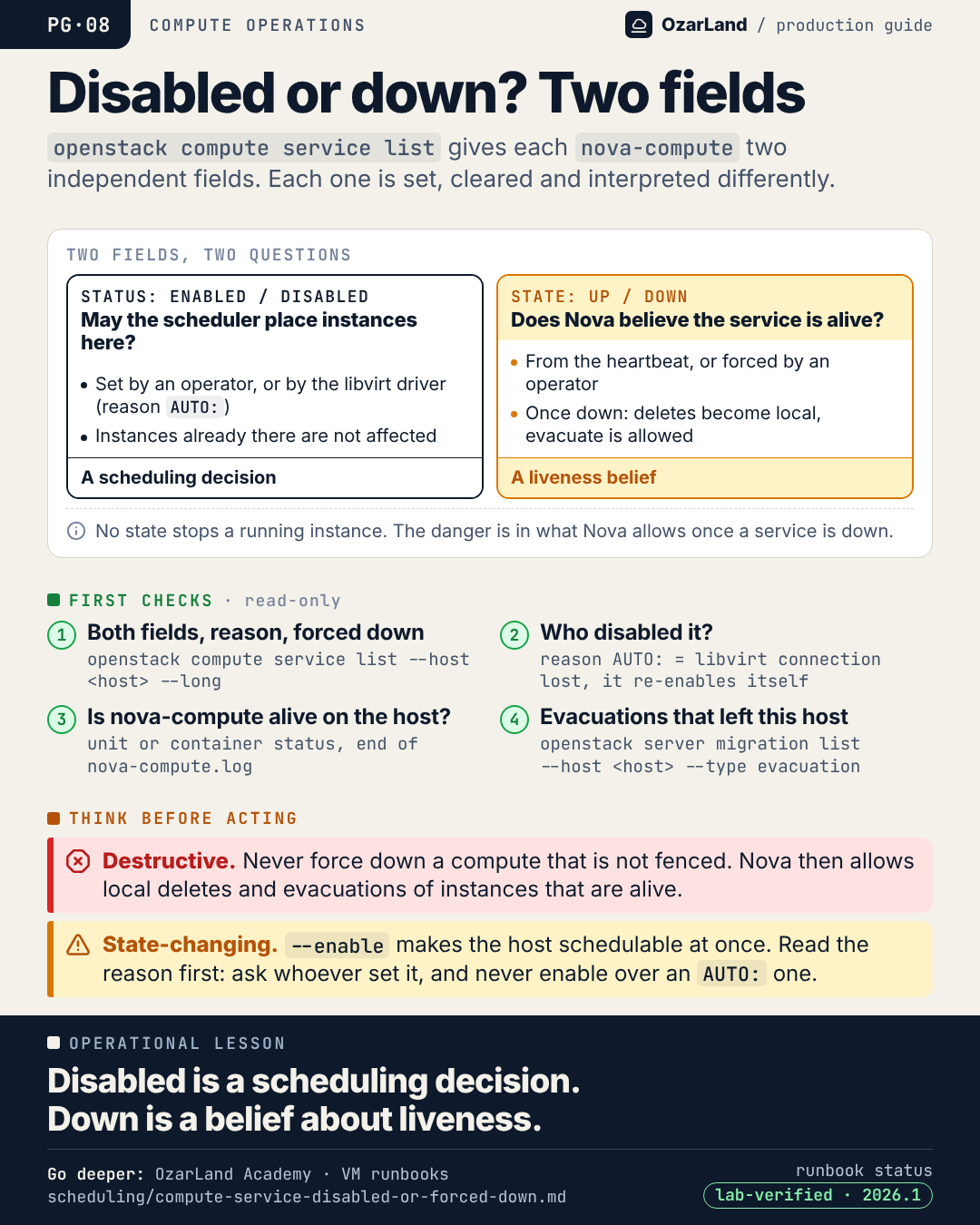
PG-08 · Compute service: disabled and down are two different things
Image: dist/pg-08-disabled-or-down.png
openstack compute service list shows two fields for every nova-compute. They are independent, and mixing them up is how instances get lost.

Status (enabled / disabled) answers: may the scheduler place new instances here?
It is a scheduling decision. Running instances are not affected.

State (up / down) answers: does Nova believe the service is alive?
It comes from the heartbeat, or from an operator who forced it down.

The danger is in what Nova allows once a service is down: deleting an instance becomes a local delete (the guest runs on until nova-compute returns and destroys it), and evacuation is allowed.

So never force down a compute that is not fenced. And before you re-enable one, read the disable reason: a reason starting with "AUTO:" was set by the libvirt driver and clears itself.

Runbook: https://github.com/OzarLand/ozarland-academy/blob/main/docs/runbooks/scheduling/compute-service-disabled-or-forced-down.md
More memos: https://github.com/OzarLand/ozarland-academy/tree/main/docs/production

#OpenStack #Nova #CloudOperations #SRE #InfrastructureEngineering #OzarLand
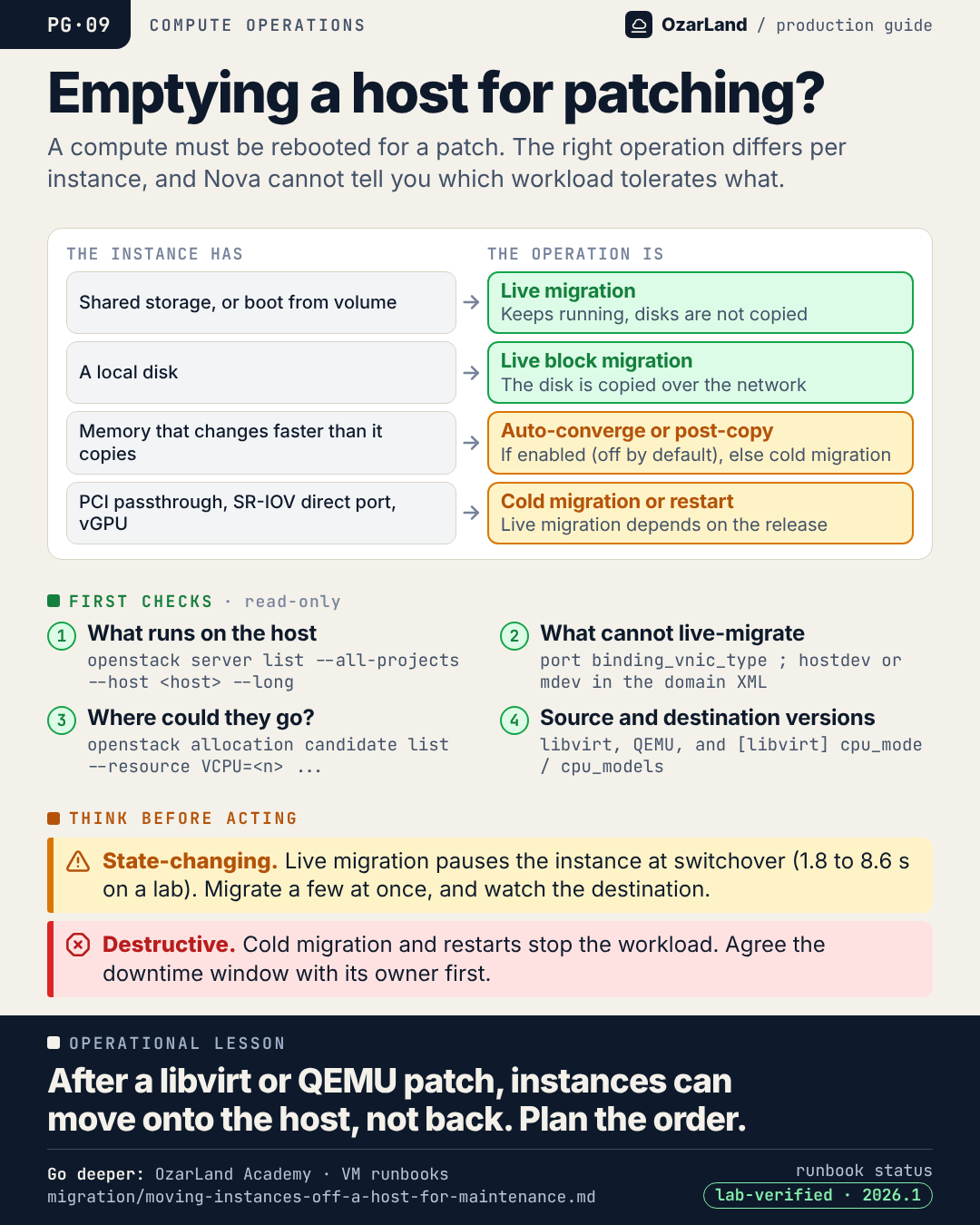
PG-09 · Emptying a compute host: one operation does not fit every instance
Image: dist/pg-09-emptying-a-host-for-maintenance.png
A compute needs a reboot for a kernel or QEMU patch. "Just live-migrate everything" is rarely the whole answer.

The operation depends on the instance:
→ shared storage or boot from volume: live migration
→ local disk: live block migration, the disk travels over the network
→ memory changing faster than it copies: auto-converge or post-copy if enabled (off by default), else cold migration
→ PCI passthrough, SR-IOV direct ports, vGPU: cold migration or restart, depending on your release

And one trap of every patching campaign: migration from a newer libvirt/QEMU to an older one is not supported. Once a host is patched, instances can move onto it, but not back. The order of patching decides where instances can go.

Nova cannot tell you which workload tolerates a pause or a restart. The owning teams can.

Runbook: https://github.com/OzarLand/ozarland-academy/blob/main/docs/runbooks/migration/moving-instances-off-a-host-for-maintenance.md
More memos: https://github.com/OzarLand/ozarland-academy/tree/main/docs/production

#OpenStack #Nova #LiveMigration #Patching #CloudOperations #OzarLand
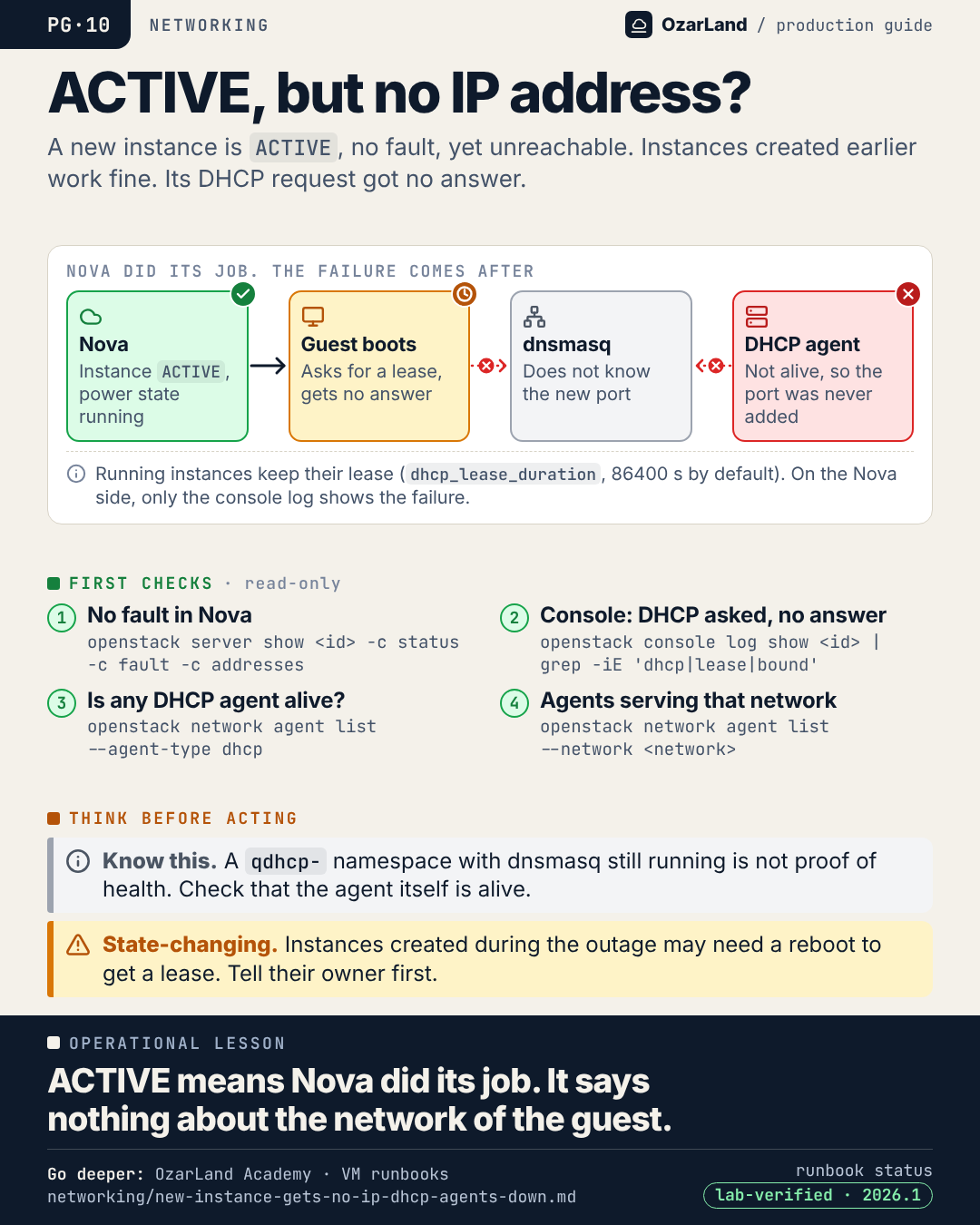
PG-10 · ACTIVE, no fault, no IP address: Nova did its job
Image: dist/pg-10-active-but-no-ip.png
A new instance is ACTIVE. No fault. Nothing in the Nova logs. And nobody can reach it.

Instances created yesterday are fine, which makes it look like a problem with this one VM. It is not.

With ML2/OVS, a new port must be added to dnsmasq by a DHCP agent. If no agent is alive, the guest asks for a lease and never gets an answer. Running instances keep theirs (24 hours by default), so the outage is invisible until someone creates an instance.

Where to look:
→ the console log of the guest: DHCP asked, never answered
→ openstack network agent list --agent-type dhcp

ACTIVE means Nova did its job. It says nothing about the network of the guest.

Runbook: https://github.com/OzarLand/ozarland-academy/blob/main/docs/runbooks/networking/new-instance-gets-no-ip-dhcp-agents-down.md
More memos: https://github.com/OzarLand/ozarland-academy/tree/main/docs/production

#OpenStack #Neutron #Networking #CloudOperations #SRE #OzarLand
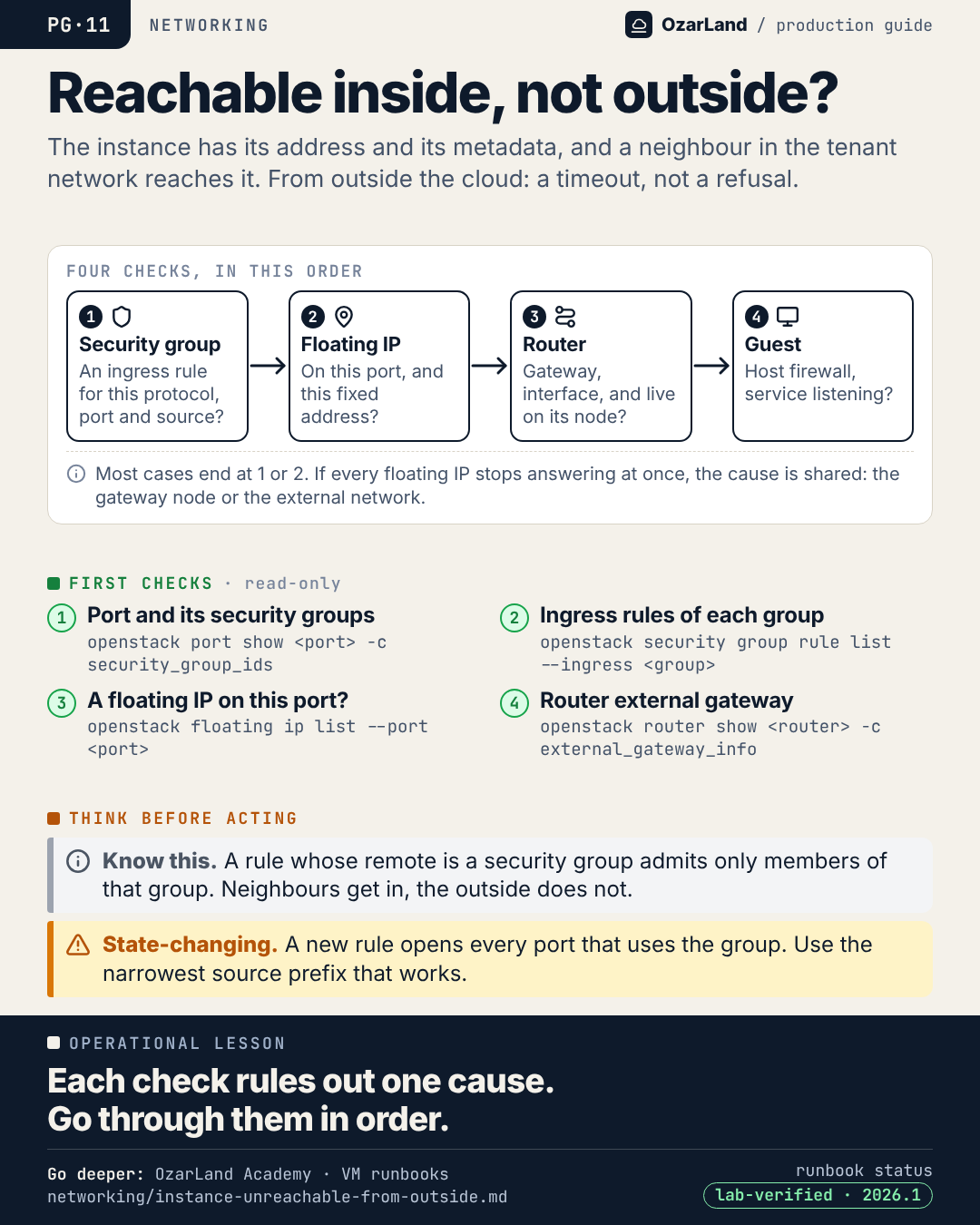
PG-11 · Reachable from inside, not from outside: four checks, in order
Image: dist/pg-11-unreachable-from-outside.png
The instance got its address and its metadata. A neighbour in the same network reaches it. From outside: timeout.

This is rarely a mystery. It is four things to check, in order:
1. Security group: is there an ingress rule for this protocol, port and source?
2. Floating IP: is it on this port, and on this fixed address?
3. Router: an interface and a gateway, and is it really live on its node?
4. The guest: its own firewall, a service actually listening?

Most cases end at 1 or 2.

One classic trap: an ingress rule whose remote is a security group, not a prefix. It admits members of that group only. That is exactly why the neighbour gets in and the outside does not.

Runbook: https://github.com/OzarLand/ozarland-academy/blob/main/docs/runbooks/networking/instance-unreachable-from-outside.md
More memos: https://github.com/OzarLand/ozarland-academy/tree/main/docs/production

#OpenStack #Neutron #Networking #SecurityGroups #CloudOperations #OzarLand
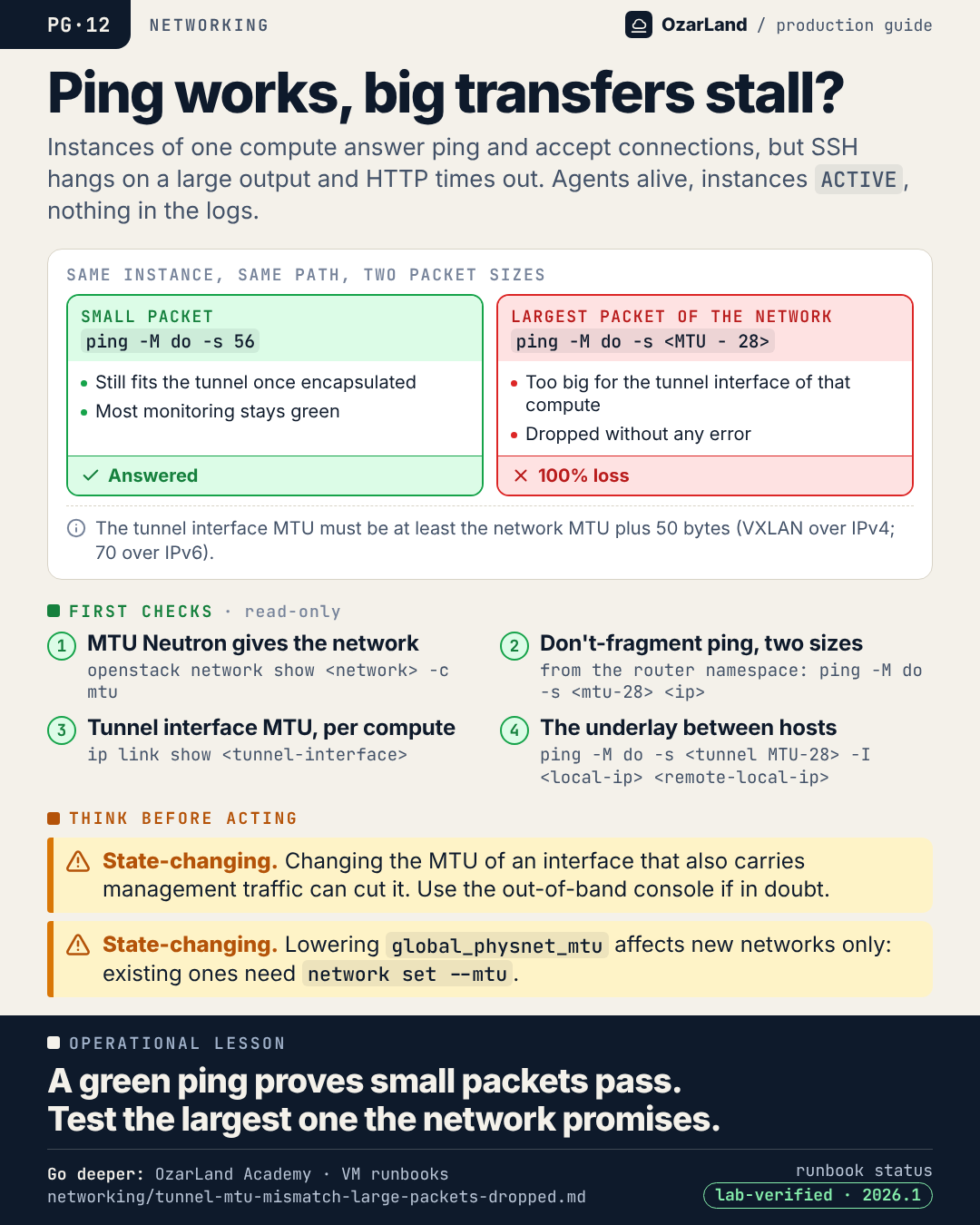
PG-12 · Ping works, large transfers stall: test the largest packet
Image: dist/pg-12-ping-works-transfers-stall.png
Users say the service is "slow" or "hangs". Ping answers. SSH logs in, then freezes on a large output. Agents are alive, instances ACTIVE, the logs are clean.

On one compute, the interface that carries the VXLAN tunnels has a smaller MTU than Neutron assumes. Small packets still fit once encapsulated. Full-size packets do not, and are dropped without any error.

One test shows it, a don't-fragment ping at two sizes:
→ ping -M do -s 56: answered
→ ping -M do -s <network MTU - 28>: 100% loss

The rule: the tunnel interface MTU must be at least the network MTU plus 50 bytes for VXLAN over IPv4.

A green ping only proves that small packets pass.

Runbook: https://github.com/OzarLand/ozarland-academy/blob/main/docs/runbooks/networking/tunnel-mtu-mismatch-large-packets-dropped.md
More memos: https://github.com/OzarLand/ozarland-academy/tree/main/docs/production

#OpenStack #Neutron #Networking #MTU #VXLAN #OzarLand
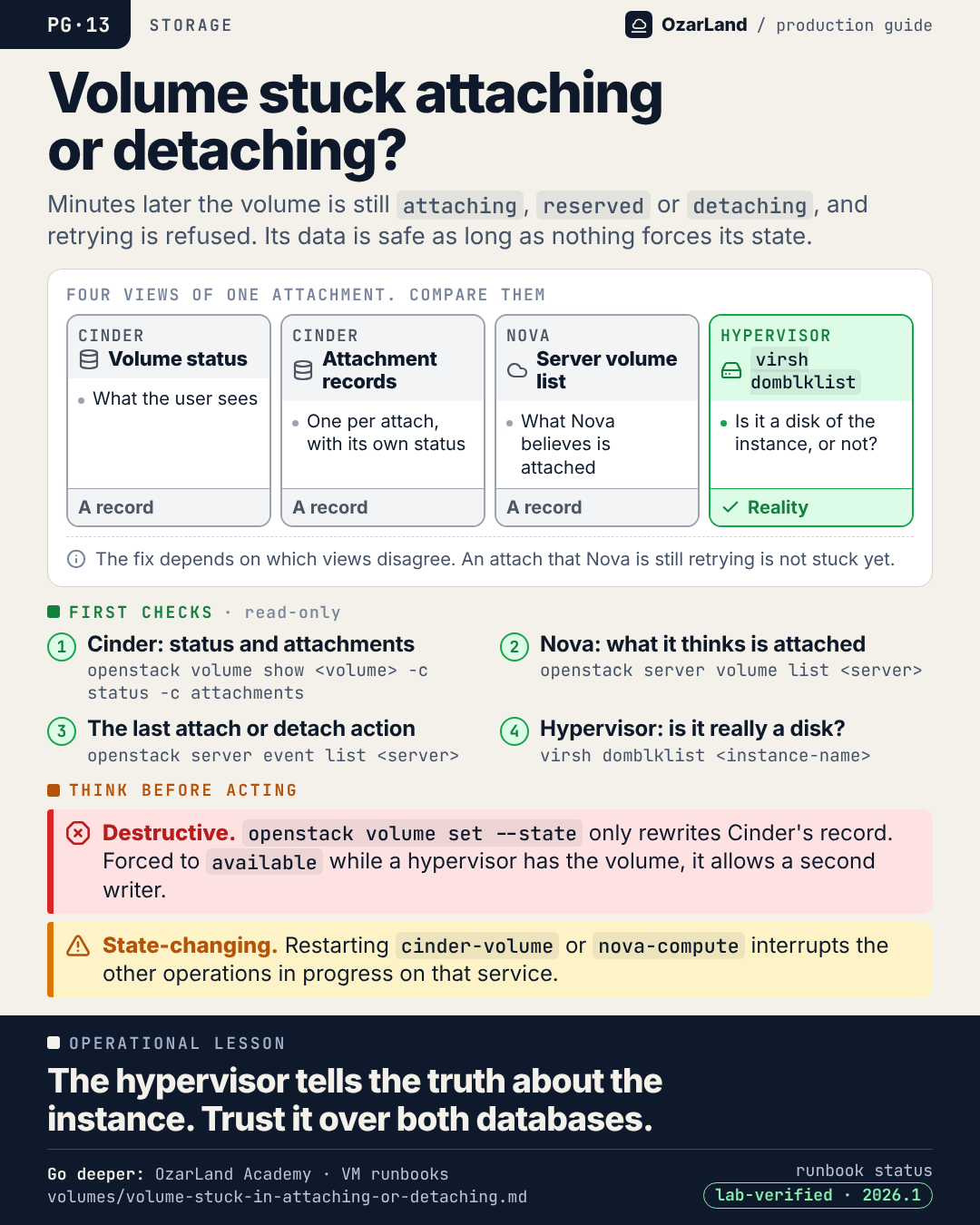
PG-13 · Volume stuck in attaching or detaching: four views, one truth
Image: dist/pg-13-volume-stuck-attaching-or-detaching.png
A volume sits in "attaching" or "detaching" and every retry is refused. The tempting fix is one command: reset its state.

That command only rewrites Cinder's database record. It does not check the hypervisor. If a hypervisor still has the volume open, the next attach gives it a second writer, and two writers corrupt a filesystem.

Before any fix, compare four views of the same attachment:
→ Cinder: the volume status
→ Cinder: the attachment records
→ Nova: the server's volume list
→ the hypervisor: virsh domblklist

Three of them are database records. One is reality. The fix depends on which ones disagree.

The data is safe as long as nothing forces the state.

Runbook: https://github.com/OzarLand/ozarland-academy/blob/main/docs/runbooks/volumes/volume-stuck-in-attaching-or-detaching.md
More memos: https://github.com/OzarLand/ozarland-academy/tree/main/docs/production

#OpenStack #Cinder #Nova #Storage #CloudOperations #OzarLand
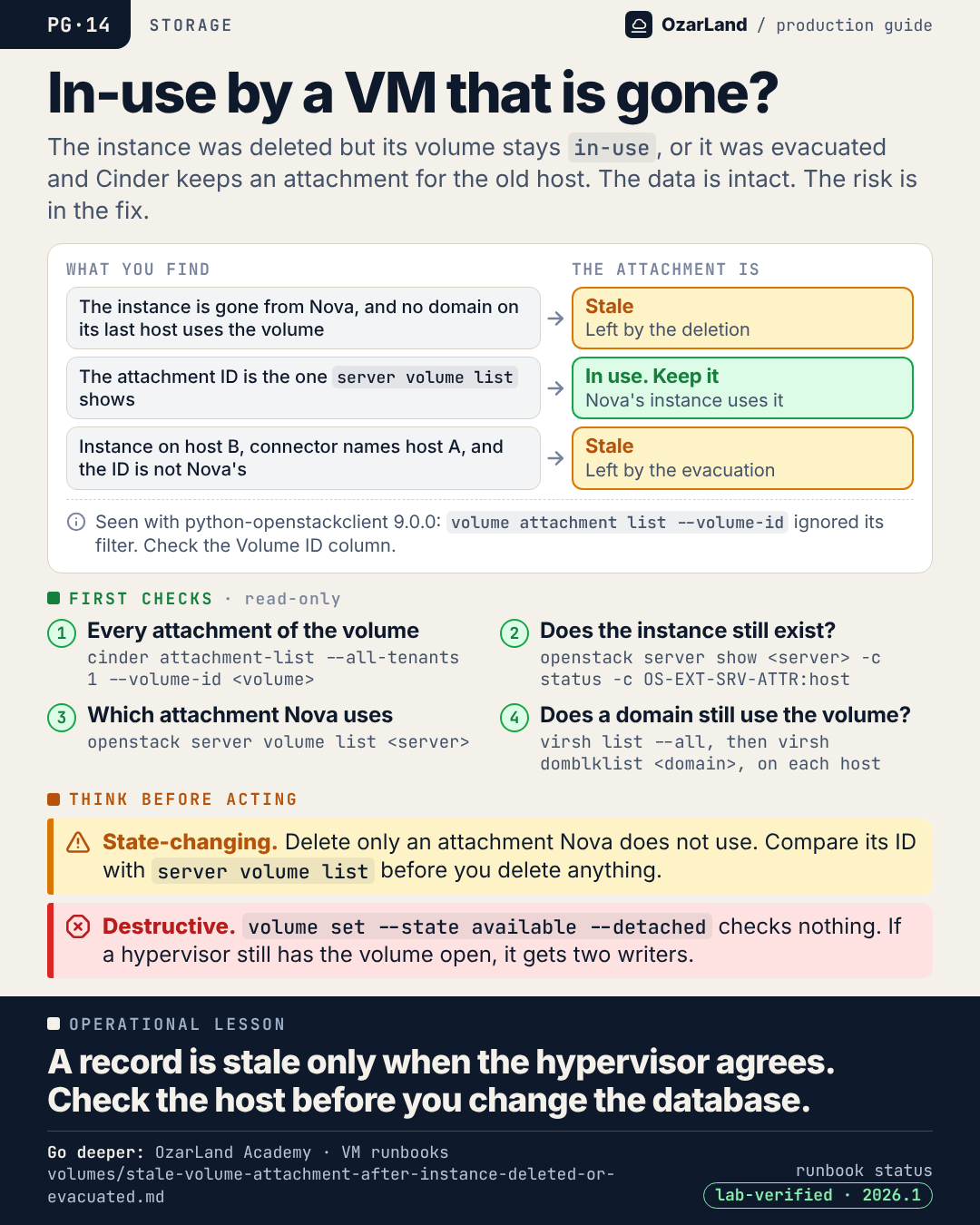
PG-14 · A volume still in-use for an instance that no longer exists
Image: dist/pg-14-volume-in-use-by-a-missing-instance.png
The instance was deleted, or evacuated. Its volume is still "in-use", with an attachment that points at something gone. After a deletion it can be neither deleted nor attached anywhere else.

The data is intact. The risk is entirely in the fix.

An attachment record is stale only if the hypervisor agrees:
→ instance gone from Nova, no domain on its last host uses the volume: stale, left by the deletion
→ the attachment ID is the one Nova's server volume list shows: in use, keep it
→ the instance runs on host B, the connector names host A, and the ID is not the one Nova uses: stale, left by the evacuation

Forcing the volume back to "available" checks none of this. If a hypervisor still has it open, the next attach creates a second writer.

Check the host before you touch the database.

Runbook: https://github.com/OzarLand/ozarland-academy/blob/main/docs/runbooks/volumes/stale-volume-attachment-after-instance-deleted-or-evacuated.md
More memos: https://github.com/OzarLand/ozarland-academy/tree/main/docs/production

#OpenStack #Cinder #Storage #DataIntegrity #CloudOperations #OzarLand
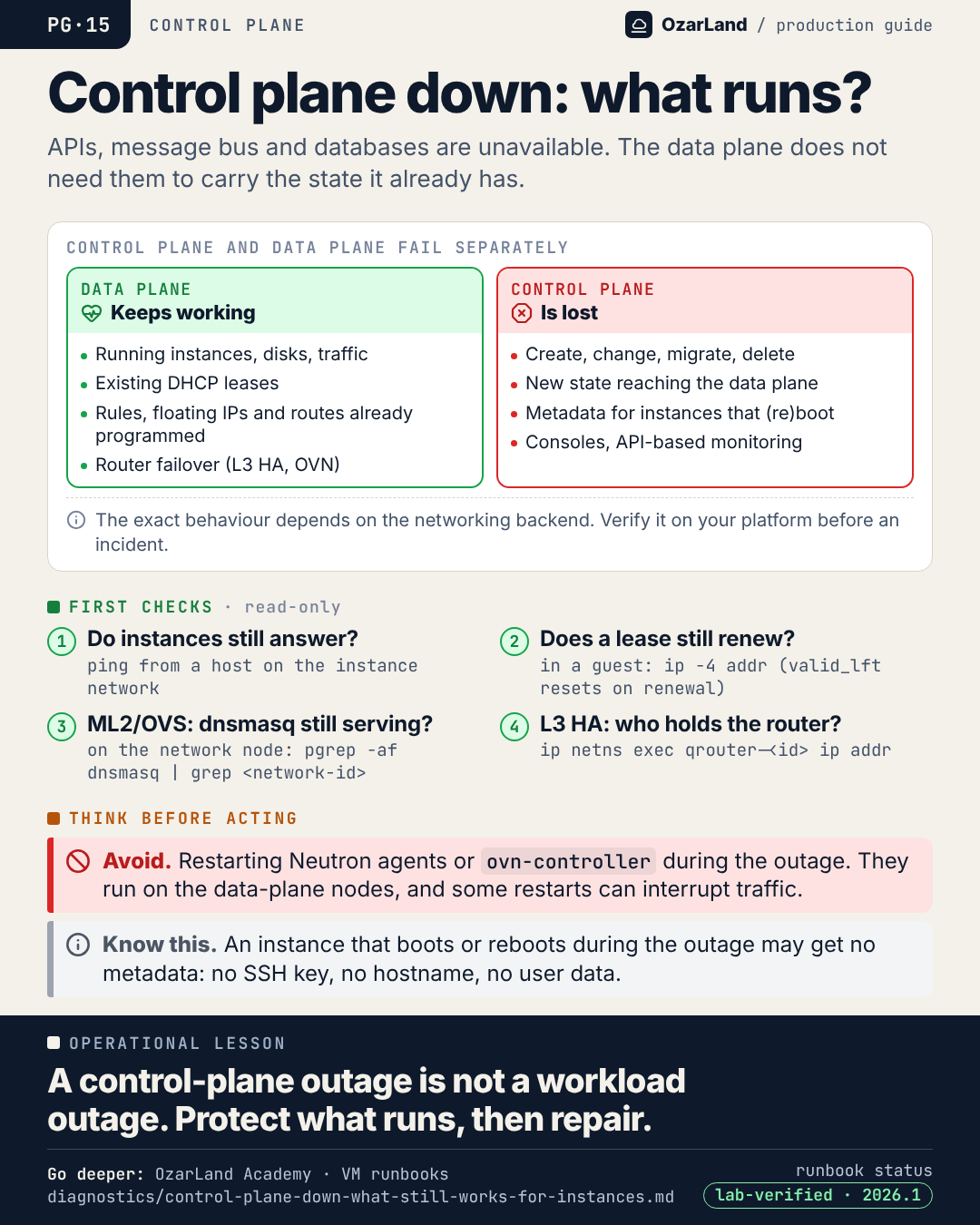
PG-15 · Control plane down is not the same as workloads down
Image: dist/pg-15-control-plane-down.png
The APIs do not answer. The message bus is broken. The database is unavailable. Is production down?

Not necessarily. The control plane and the data plane fail separately, and the data plane does not need the APIs to carry the state it already has.

What keeps working:
→ running instances, their disks, their traffic
→ existing DHCP leases
→ security groups, floating IPs and routes already programmed

What is lost:
→ create, change, migrate, delete
→ any new state reaching the data plane
→ metadata for instances that boot or reboot
→ consoles, and monitoring that reads the APIs

This is what makes "protect the running workloads, then repair" a real option. But it depends on your networking backend: verify it on a lab before the incident, and write the result down.

Runbook: https://github.com/OzarLand/ozarland-academy/blob/main/docs/runbooks/diagnostics/control-plane-down-what-still-works-for-instances.md
More memos: https://github.com/OzarLand/ozarland-academy/tree/main/docs/production

#OpenStack #ControlPlane #IncidentResponse #CloudOperations #SRE #OzarLand
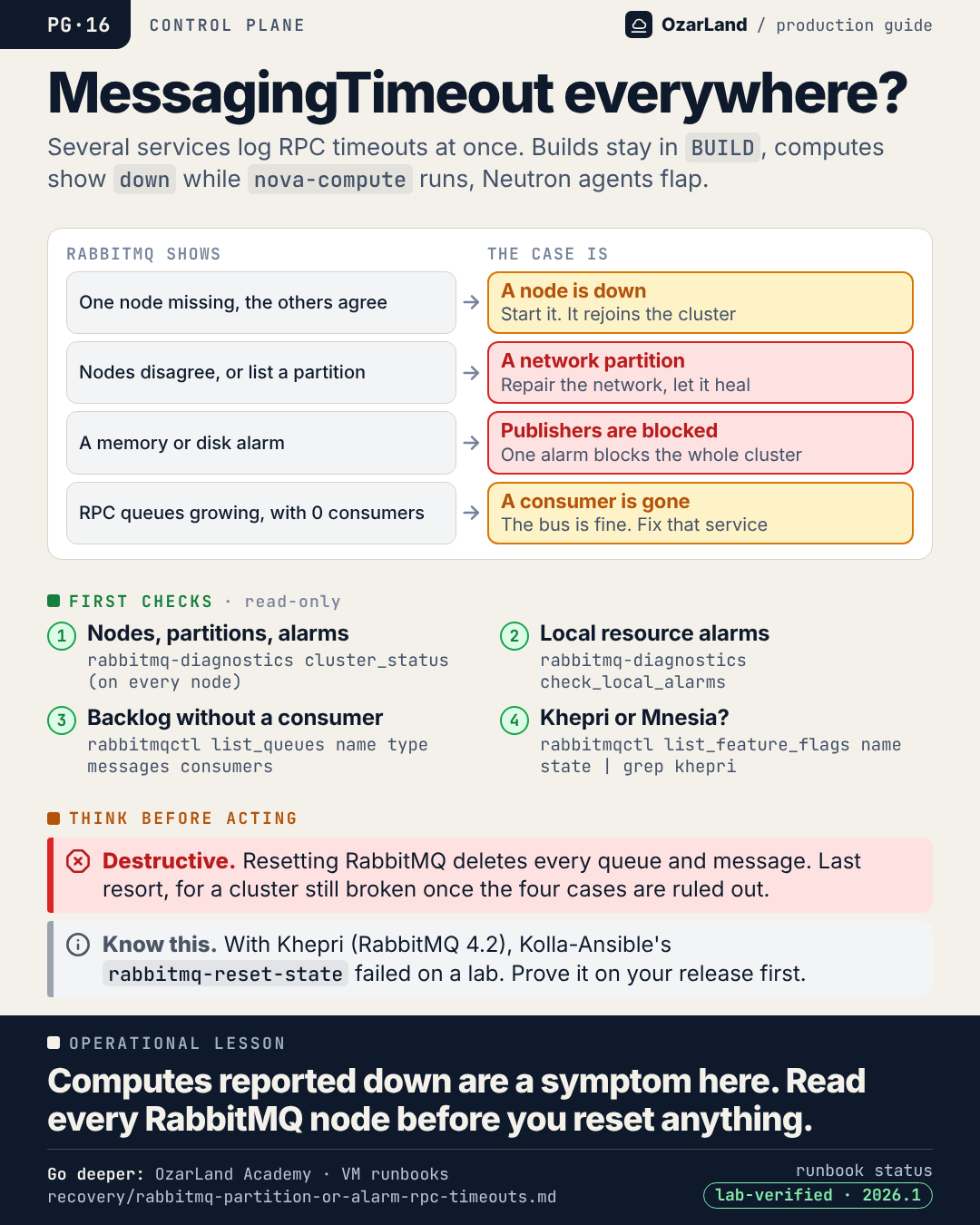
PG-16 · MessagingTimeout in every service: diagnose the bus before the services
Image: dist/pg-16-rpc-timeouts-everywhere.png
MessagingTimeout in Nova. In Neutron. In Cinder. Computes reported down although nova-compute is running. Agents flapping.

When every service shows the same symptom at once, start with what they share: the message bus.

On every RabbitMQ node, read-only:
→ one node missing, the others agree: a node is down
→ nodes disagree, or partitions listed: a network partition
→ a memory or disk alarm: publishers are blocked, cluster-wide
→ RPC queues growing with 0 consumers: the bus is fine, a service is gone

Four cases, four different responses. And one thing to keep for last: resetting RabbitMQ deletes every queue and every message.

Running instances keep running through all of this.

Runbook: https://github.com/OzarLand/ozarland-academy/blob/main/docs/runbooks/recovery/rabbitmq-partition-or-alarm-rpc-timeouts.md
More memos: https://github.com/OzarLand/ozarland-academy/tree/main/docs/production

#OpenStack #RabbitMQ #ControlPlane #IncidentResponse #CloudOperations #OzarLand
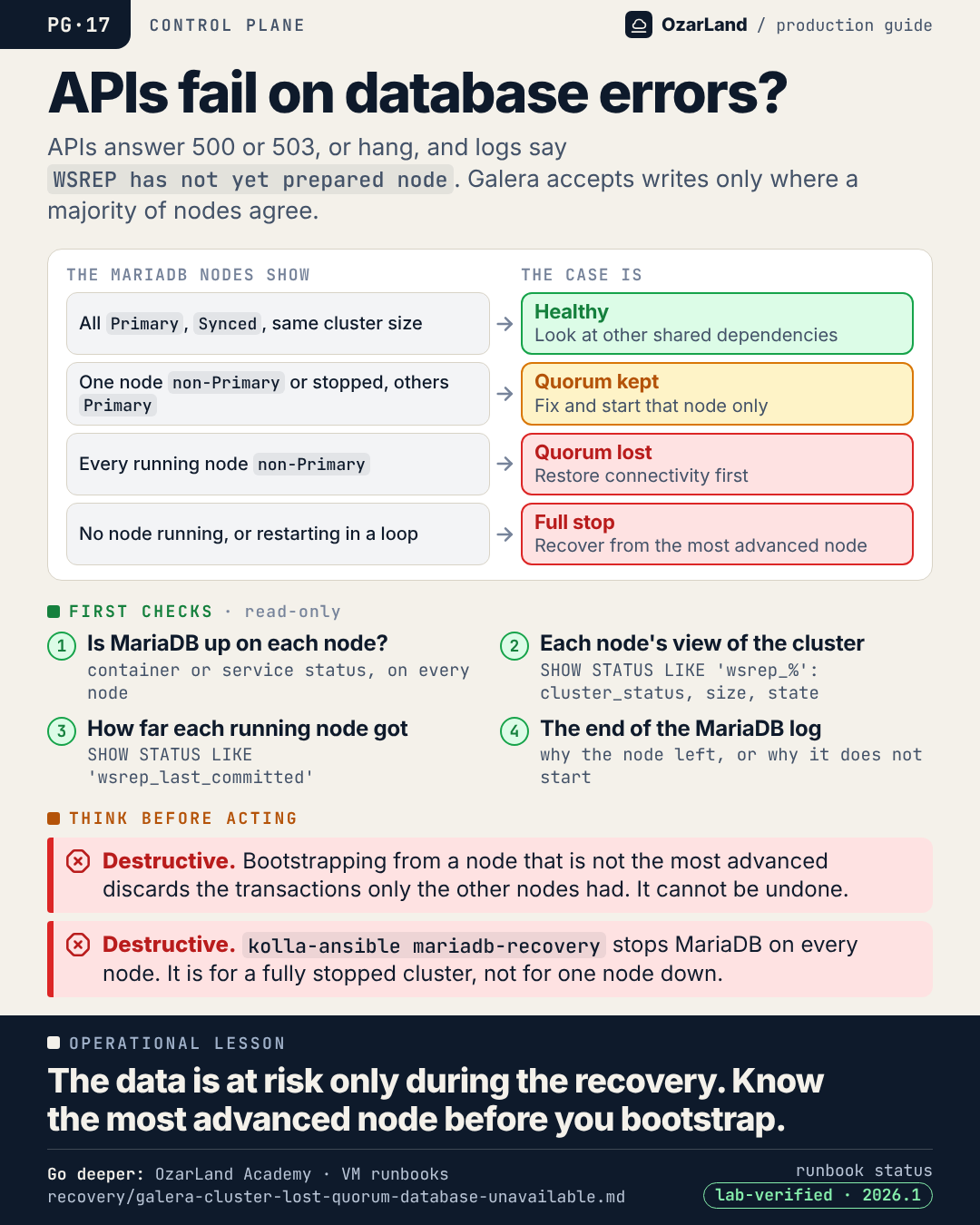
PG-17 · Galera lost quorum: the data is at risk during the recovery, not before
Image: dist/pg-17-galera-lost-quorum.png
Most OpenStack APIs fail or hang. The logs show database errors: "WSREP has not yet prepared node for application use", or a ProxySQL connect timeout.

Galera accepts writes only in a Primary component, a majority of the last known nodes. Lose the majority and the remaining nodes refuse queries. That is a safety mechanism, not the failure.

Running instances keep running. And the data is not at risk yet. It becomes at risk during the recovery, if the cluster is bootstrapped from a node that is not the most advanced: the transactions only the other nodes had are discarded, for good.

So before any recovery command, on every node:
→ is MariaDB running?
→ wsrep_cluster_status: Primary or non-Primary?
→ wsrep_last_committed: how far did this node get?

One node down, quorum lost and full stop are three different cases with three different answers.

Runbook: https://github.com/OzarLand/ozarland-academy/blob/main/docs/runbooks/recovery/galera-cluster-lost-quorum-database-unavailable.md
More memos: https://github.com/OzarLand/ozarland-academy/tree/main/docs/production

#OpenStack #MariaDB #Galera #ControlPlane #DatabaseReliability #OzarLand
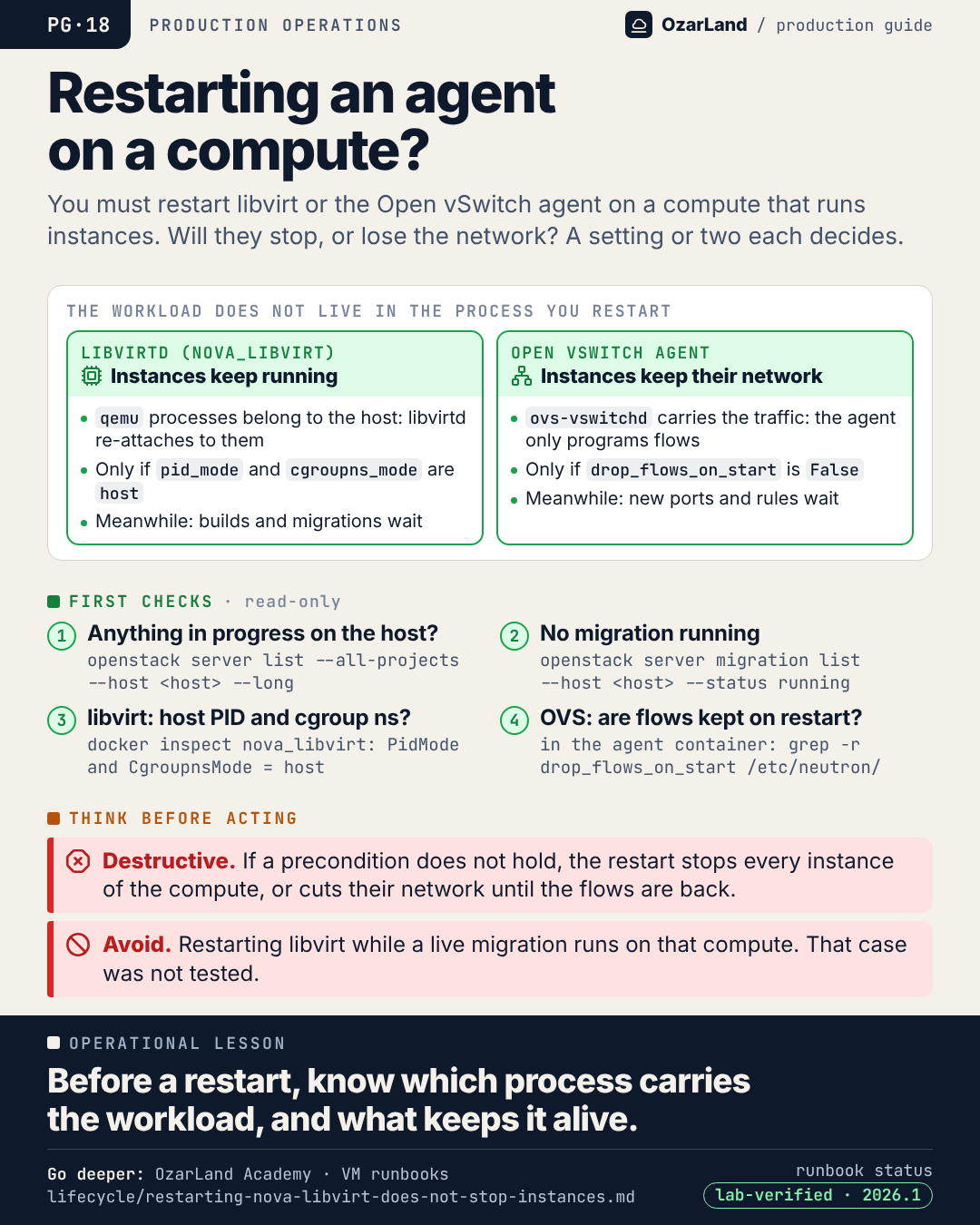
PG-18 · Restarting libvirt or the OVS agent: will the instances survive?
Image: dist/pg-18-before-restarting-an-agent.png
"I need to restart libvirt on a compute that runs 40 instances. Will they stop?"

The answer comes from knowing which process actually carries the workload.

libvirtd: the qemu processes are processes of the host, not children locked inside the container. A new libvirtd re-attaches to them. It holds only if the container runs in the host's PID and cgroup namespaces.

Open vSwitch agent: it does not carry traffic, ovs-vswitchd does. The agent only programs flows, and they stay in place while it restarts. It holds only if drop_flows_on_start is False, the default.

In both cases something does wait during the restart: builds, migrations, new ports, security group changes.

A setting or two stand between "nobody noticed" and "every instance on the host stopped or cut off". Check it before, not after.

Runbook: https://github.com/OzarLand/ozarland-academy/blob/main/docs/runbooks/lifecycle/restarting-nova-libvirt-does-not-stop-instances.md
More memos: https://github.com/OzarLand/ozarland-academy/tree/main/docs/production

#OpenStack #Nova #Neutron #ChangeManagement #CloudOperations #OzarLand
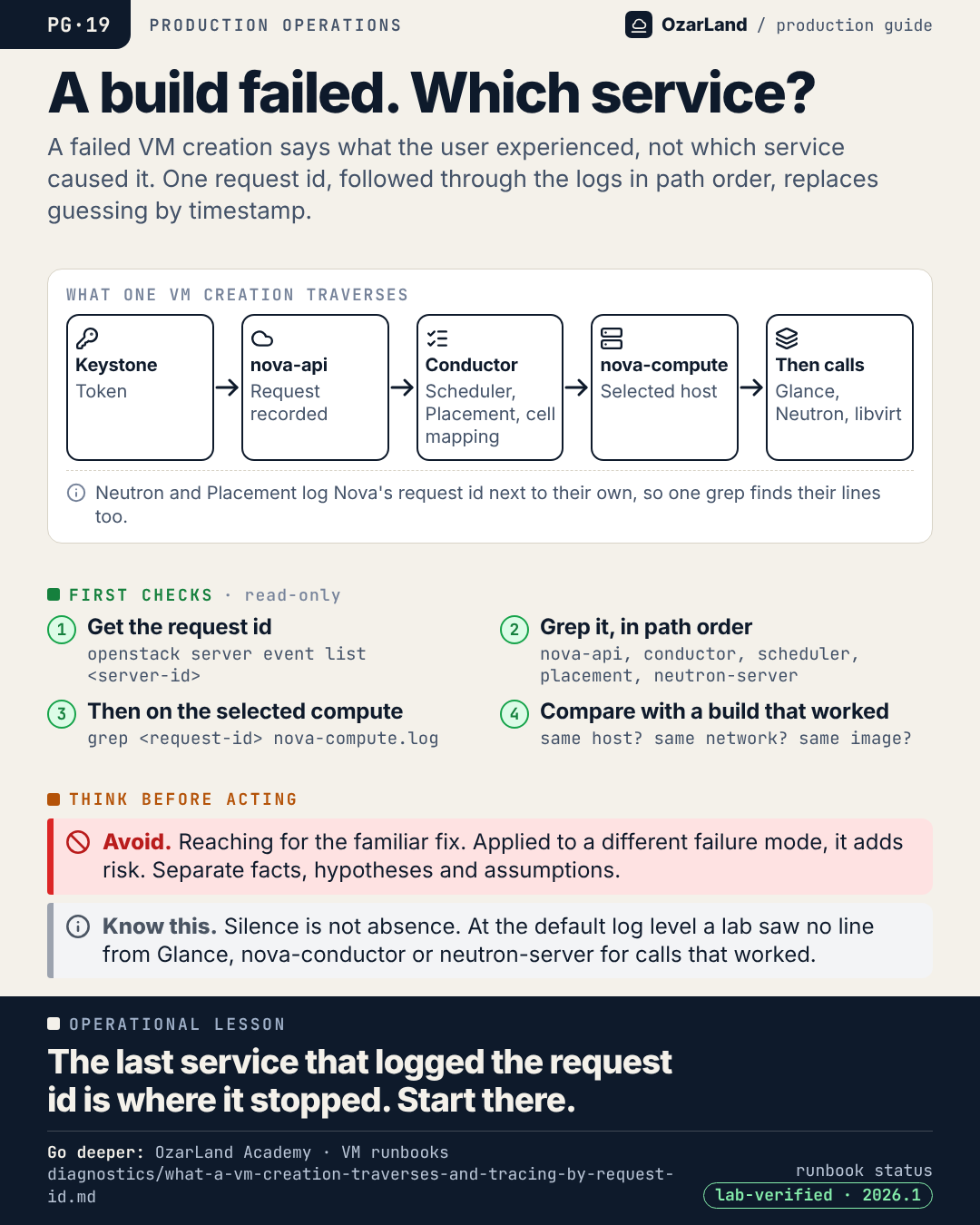
PG-19 · A VM creation failed. Follow one request id, not the timestamps.
Image: dist/pg-19-trace-one-request.png
A failed VM creation tells you what the user experienced. It does not tell you which service caused it.

A scheduling problem looks like a Nova problem. A network timeout looks like a Neutron problem. The architecture makes each one plausible without making any of them true.

One build traverses Keystone, nova-api, the conductor and scheduler with Placement, nova-compute on the selected host, then Glance, Neutron and libvirt. Every API request carries a request id that the services propagate in their logs.

So:
1. get the request id from the server's events
2. grep it through the services, in path order
3. the last service that logged it is where the request stopped

Then compare with a request that succeeded. Same host? Same network? Same image? The difference is the lead.

Runbook: https://github.com/OzarLand/ozarland-academy/blob/main/docs/runbooks/diagnostics/what-a-vm-creation-traverses-and-tracing-by-request-id.md
More memos: https://github.com/OzarLand/ozarland-academy/tree/main/docs/production

#OpenStack #Troubleshooting #Observability #IncidentResponse #SRE #OzarLand
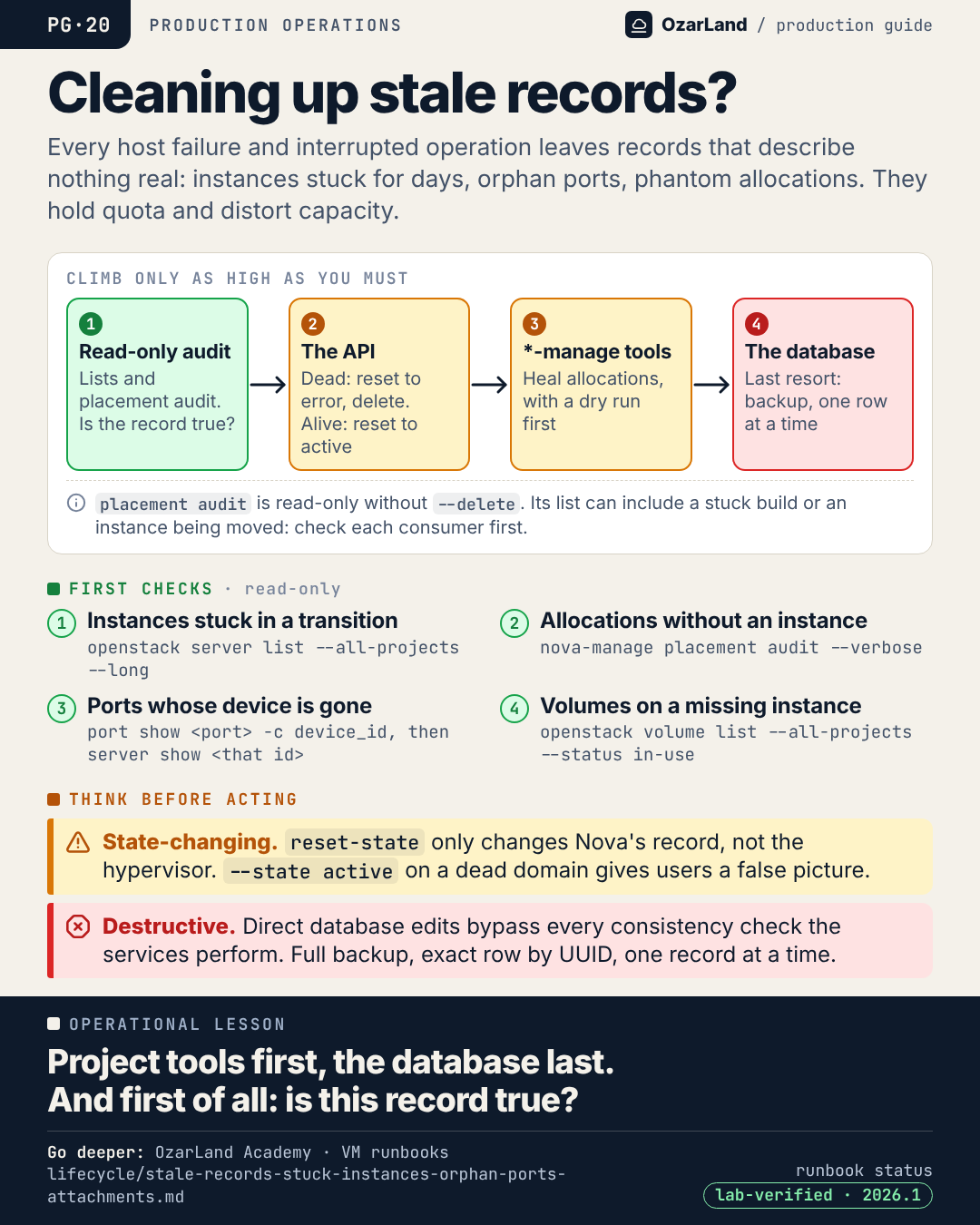
PG-20 · Stale records: project tools first, the database last
Image: dist/pg-20-cleaning-up-stale-records.png
A long-lived platform accumulates records that describe nothing real. Instances in BUILD for days. Ports whose instance is gone. Volumes attached to nothing. Placement allocations for consumers that no longer exist.

No direct outage, which is why it is neglected. But they hold quota, distort capacity, and make every investigation start with the same question: is this record true?

The clean-up is a ladder. Climb only as high as you must:
1. Read-only audit
2. The API: reset the state, then delete through the API
3. The *-manage tools: audit without --delete, heal with --dry-run first
4. The database: last resort, with a backup, one row at a time

A direct database edit bypasses every consistency check the services perform.

Runbook: https://github.com/OzarLand/ozarland-academy/blob/main/docs/runbooks/lifecycle/stale-records-stuck-instances-orphan-ports-attachments.md
More memos: https://github.com/OzarLand/ozarland-academy/tree/main/docs/production

#OpenStack #Nova #Placement #OperationalExcellence #CloudOperations #OzarLand
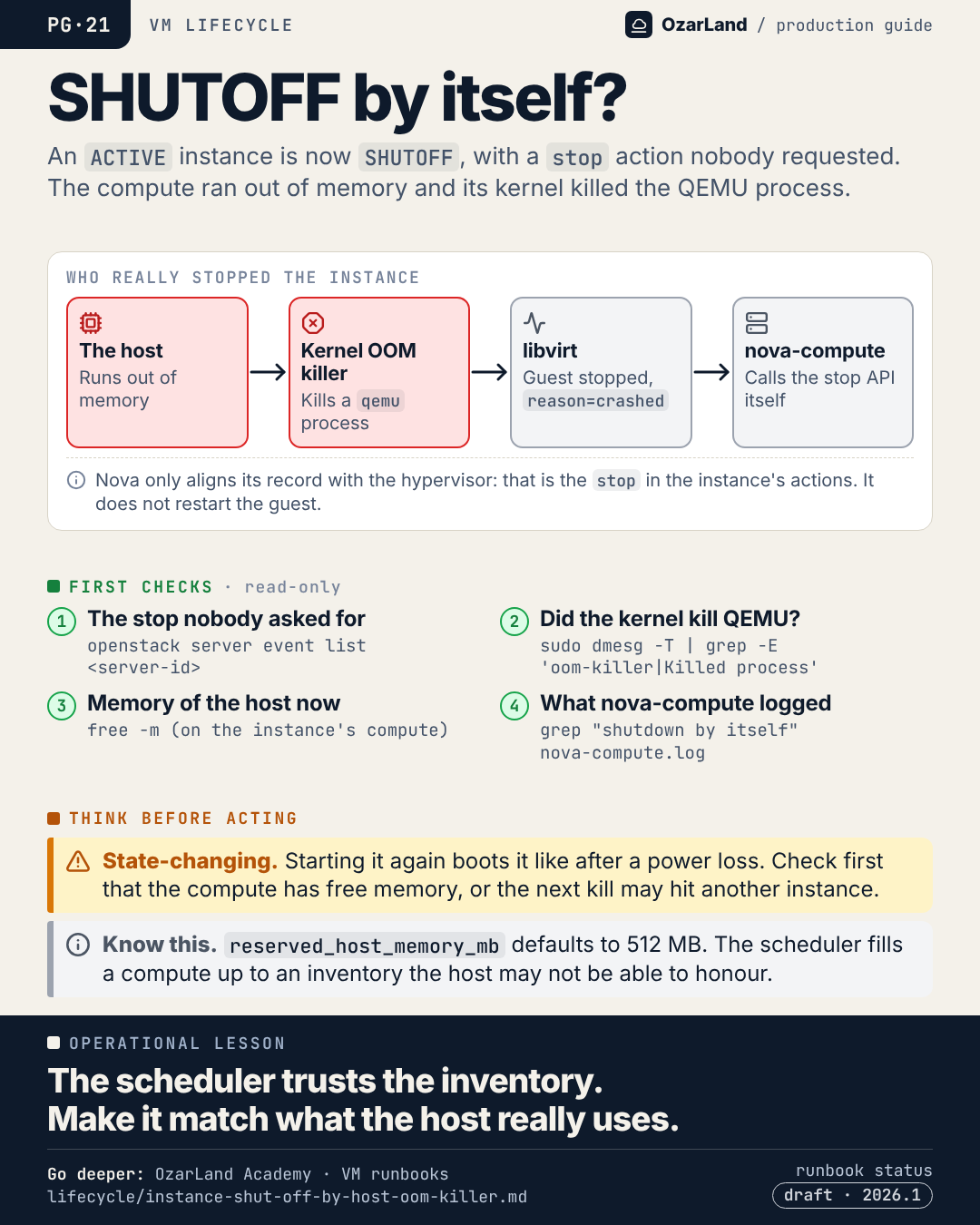
PG-21 · An instance went SHUTOFF by itself. Nova did not stop it: the kernel did.
Image: dist/pg-21-shutoff-by-itself.png
An instance that was ACTIVE is SHUTOFF. Its owner did not stop it. And yet its action list shows a "stop".

That stop was made by Nova itself, after the fact. The real sequence:
→ the compute ran out of memory
→ the kernel's OOM killer killed a QEMU process
→ libvirt reported the guest as stopped
→ nova-compute aligned its record by calling the stop API

Nova does not restart the guest. It stays SHUTOFF until someone starts it, and it boots like after a power loss.

A common root cause is not the instance but the inventory: reserved_host_memory_mb left at its 512 MB default on a host whose own services use several GB. The scheduler fills the compute up to a number the host cannot honour. Memory overcommit is another.

Source runbook status: draft. Read its limits before acting.

Runbook: https://github.com/OzarLand/ozarland-academy/blob/main/docs/runbooks/lifecycle/instance-shut-off-by-host-oom-killer.md
More memos: https://github.com/OzarLand/ozarland-academy/tree/main/docs/production

#OpenStack #Nova #Linux #CapacityPlanning #CloudOperations #OzarLand
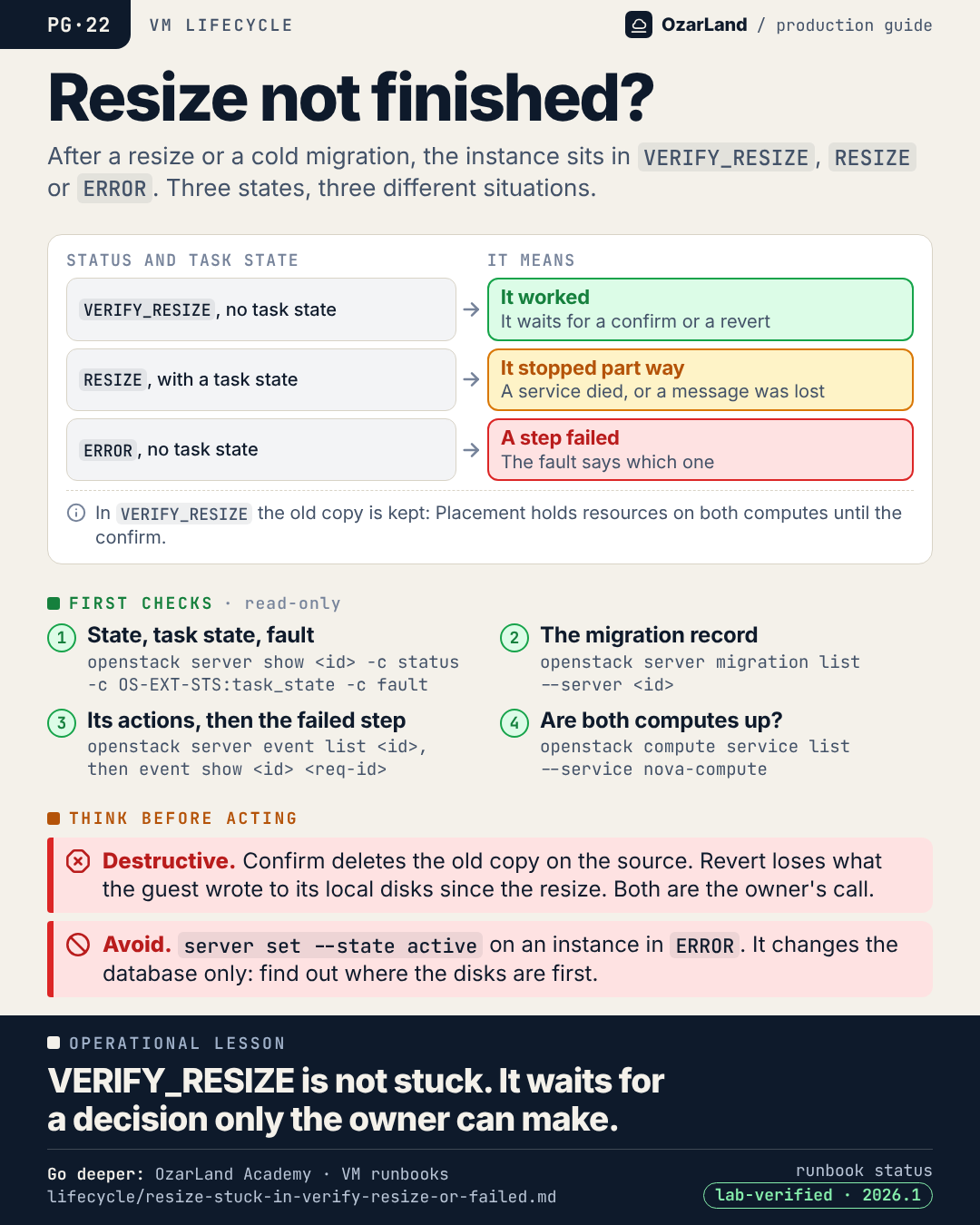
PG-22 · VERIFY_RESIZE is not a stuck state. It is a pending decision.
Image: dist/pg-22-resize-not-finished.png
After a resize or a cold migration, an instance can sit in three states that mean very different things.

→ VERIFY_RESIZE, no task state: the resize worked. It waits for a confirm or a revert, and can wait for days.
→ RESIZE, with a task state: the operation stopped part way. A service died, or a message was lost.
→ ERROR: a step failed, and the fault says which one.

The first is the one that surprises people. While an instance stays in VERIFY_RESIZE, the old copy is kept on the source and Placement holds resources on both computes. Many of them make hosts look fuller than they are.

And neither way out can be undone: confirm deletes the old copy, revert loses what the guest wrote to its local disks since the resize. That decision belongs to the owner.

Runbook: https://github.com/OzarLand/ozarland-academy/blob/main/docs/runbooks/lifecycle/resize-stuck-in-verify-resize-or-failed.md
More memos: https://github.com/OzarLand/ozarland-academy/tree/main/docs/production

#OpenStack #Nova #Placement #CloudOperations #SRE #OzarLand
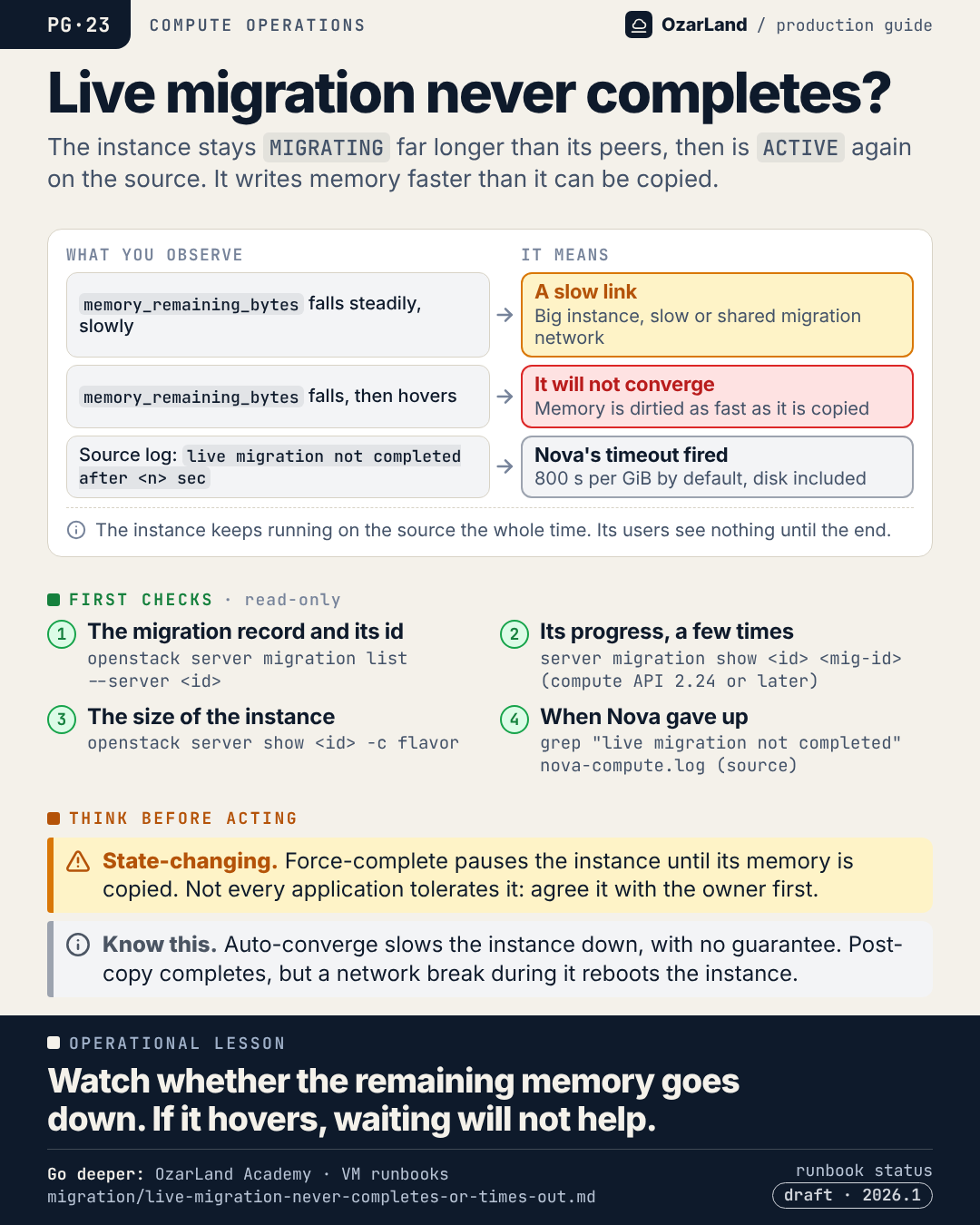
PG-23 · A live migration that never completes: watch one number
Image: dist/pg-23-live-migration-never-completes.png
A live migration starts fine. Then it runs. And runs. Much longer than the others. Eventually the instance is ACTIVE again, on the source, and the migration is marked failed.

Live migration copies memory while the instance keeps running. Every page written again must be copied again. If the instance dirties memory faster than the network copies it, the migration cannot converge.

One number tells you which case you are in, memory_remaining_bytes:
→ it falls steadily, slowly: a slow or shared migration network
→ it falls, then hovers: it will not converge without help

The ways out all have a price. Force-complete pauses the instance. Auto-converge throttles its CPU. Post-copy completes, but a network break during that phase reboots the instance.

Source runbook status: draft, not yet reproduced on a lab.

Runbook: https://github.com/OzarLand/ozarland-academy/blob/main/docs/runbooks/migration/live-migration-never-completes-or-times-out.md
More memos: https://github.com/OzarLand/ozarland-academy/tree/main/docs/production

#OpenStack #Nova #LiveMigration #Libvirt #CloudOperations #OzarLand
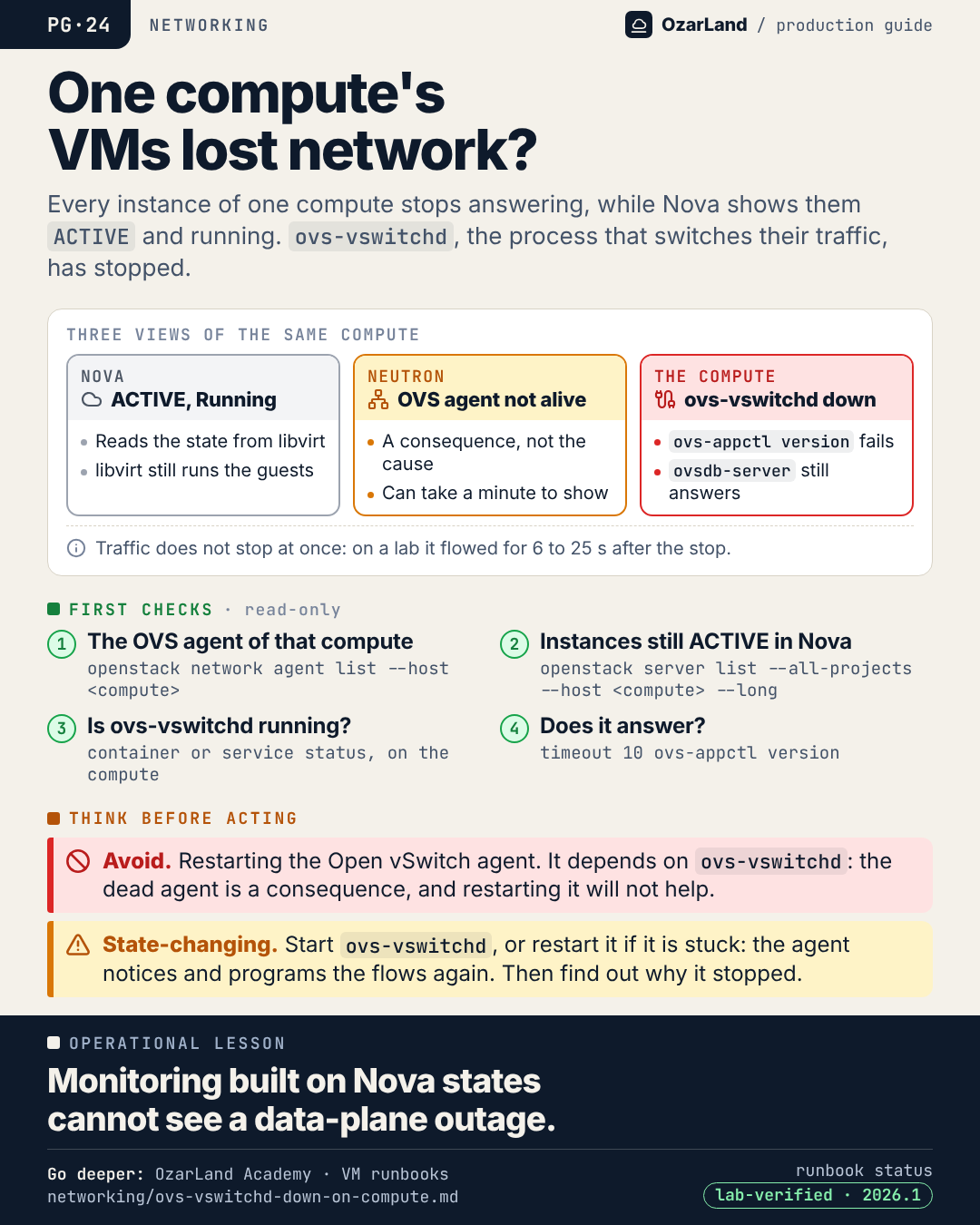
PG-24 · Every instance on one compute lost its network. Nova says ACTIVE.
Image: dist/pg-24-whole-compute-lost-network.png
Every instance on one compute stops answering. Ping, SSH, application traffic: nothing.

Nova shows all of them ACTIVE, power state Running. And Nova is right, from where it stands: it reads the state of instances from libvirt, and libvirt still runs them.

The process that actually switches their traffic, ovs-vswitchd, has stopped.

Three views of the same compute:
→ Nova: ACTIVE, Running
→ Neutron: the Open vSwitch agent is not alive (a consequence, and it can take a minute to show)
→ the compute: ovs-vswitchd does not answer

The trap is to restart the agent, because it is the one reported dead. The agent only programs flows. Start ovs-vswitchd, or restart it if it is stuck, and the agent recovers by itself.

Monitoring built on Nova states cannot see a data-plane outage.

Runbook: https://github.com/OzarLand/ozarland-academy/blob/main/docs/runbooks/networking/ovs-vswitchd-down-on-compute.md
More memos: https://github.com/OzarLand/ozarland-academy/tree/main/docs/production

#OpenStack #Neutron #OpenvSwitch #Monitoring #CloudOperations #OzarLand
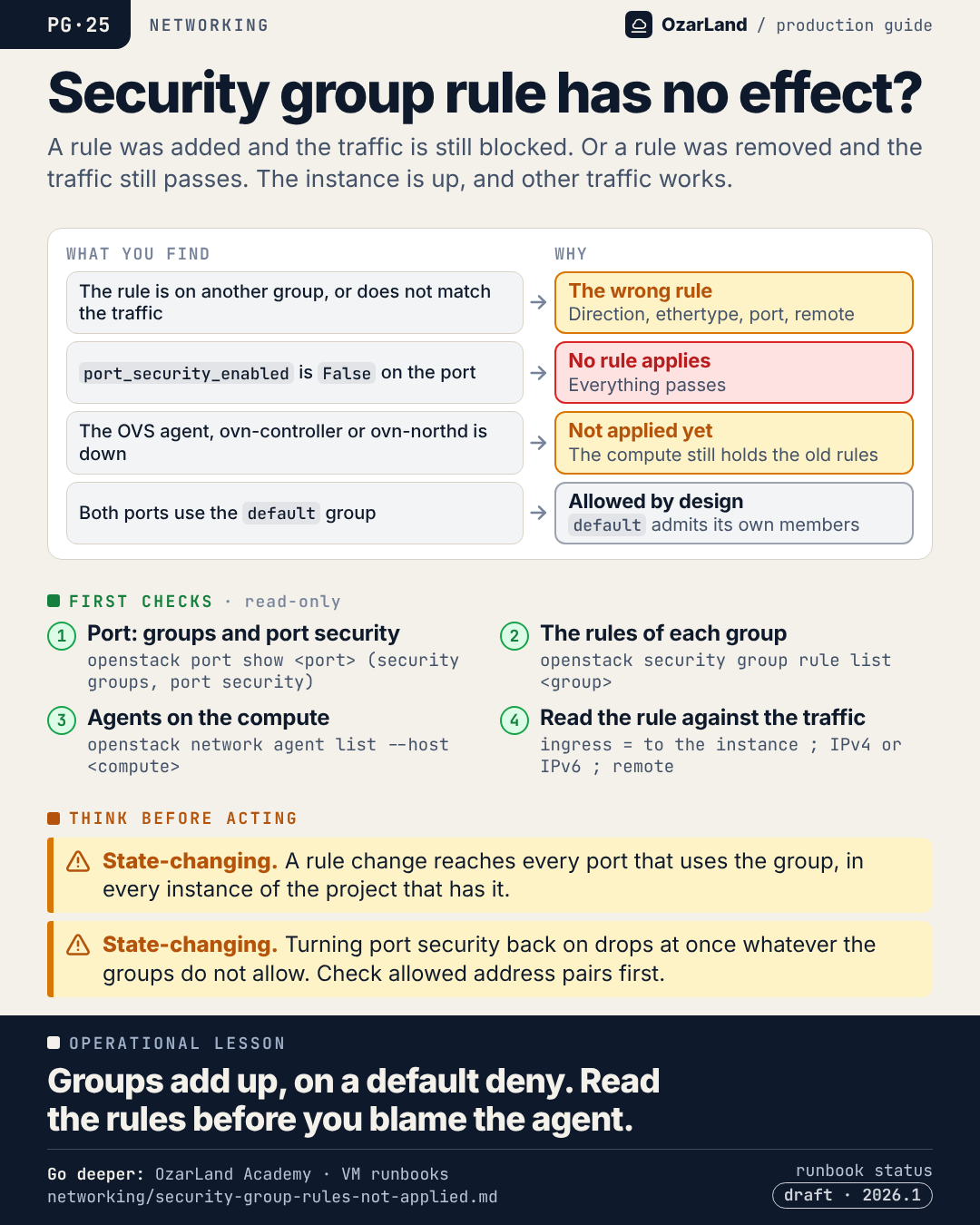
PG-25 · A security group rule that changes nothing: four things to check
Image: dist/pg-25-security-group-rule-has-no-effect.png
You add a rule. The port stays closed. Or you remove one, and the traffic still gets through.

Before blaming the agent, remember how security groups work: allow rules only, on a default deny, and the groups on a port add up. Then check four things.

→ The rule is on a group the port does not use, or it does not match: direction, ethertype (an IPv4 rule for IPv6 traffic), port range, or a remote group the traffic does not come from.
→ Port security is off on the port: no rule applies at all, everything passes.
→ The agent on the compute is dead: the rule exists in the API, the compute still holds the old ones.
→ Both instances are in "default": that group admits its own members, by design.

Only one of these four is about the agent.

Source runbook status: draft.

Runbook: https://github.com/OzarLand/ozarland-academy/blob/main/docs/runbooks/networking/security-group-rules-not-applied.md
More memos: https://github.com/OzarLand/ozarland-academy/tree/main/docs/production

#OpenStack #Neutron #SecurityGroups #Networking #CloudOperations #OzarLand
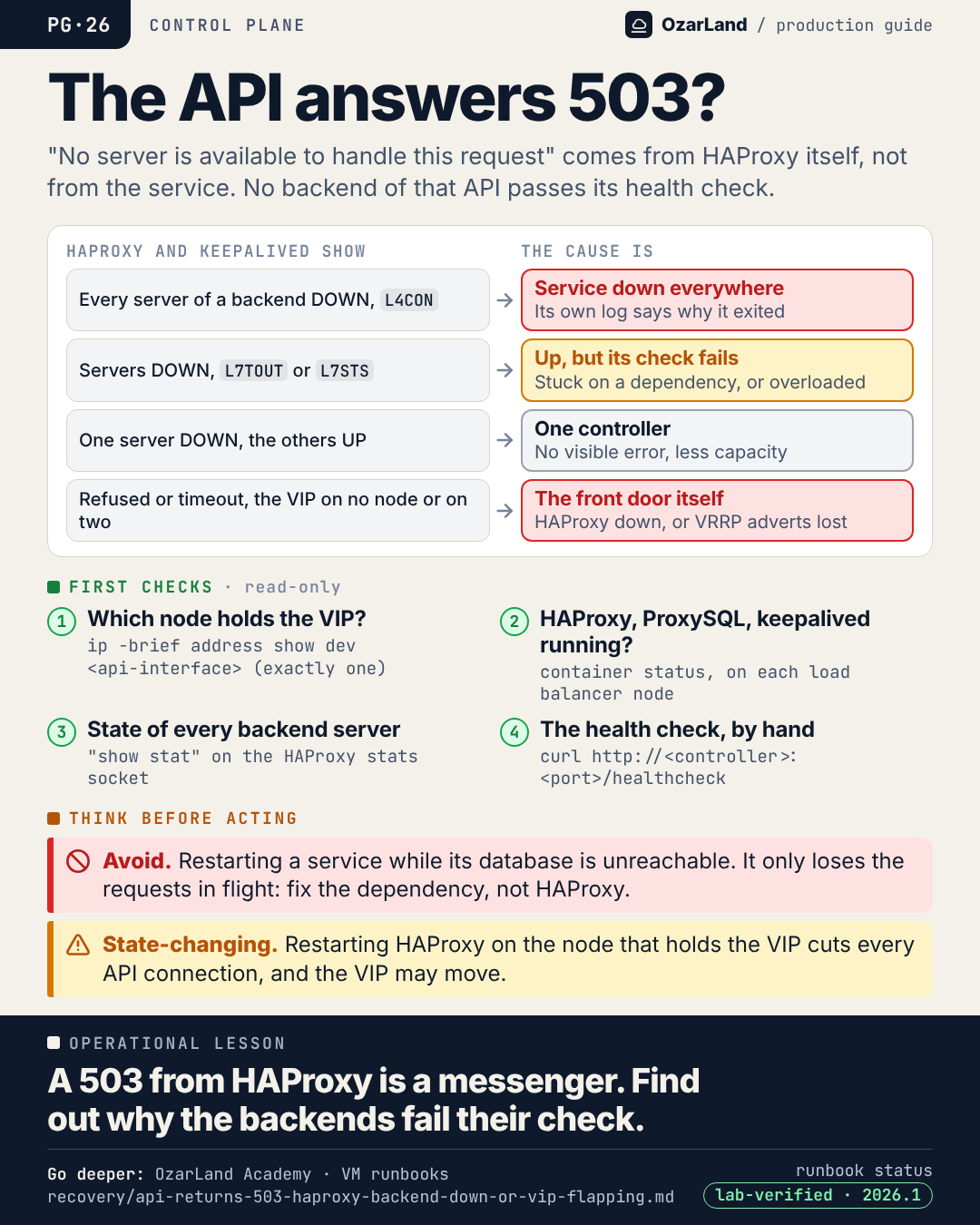
PG-26 · 503 from the API: HAProxy is the messenger, not the cause
Image: dist/pg-26-api-returns-503.png
"503 Service Unavailable: No server is available to handle this request."

That sentence does not come from Nova or Keystone. It comes from HAProxy, and it means one precise thing: no backend of that API is passing its health check.

What HAProxy shows tells you where to go next:
→ every server DOWN with L4CON: the service is down on every controller. Its own log says why.
→ servers DOWN with L7TOUT or L7STS: the service runs but cannot answer. It is stuck on a dependency, or overloaded.
→ one server DOWN, the others UP: one controller. Users see nothing.
→ no 503 but a refused connection or a timeout, with the VIP on no node or on two: the front door itself. HAProxy down everywhere, or VRRP adverts lost.

The tempting fix is to restart things at the front door. But restarting a service whose database is unreachable only loses the requests in flight.

Running instances keep running through all of it.

Runbook: https://github.com/OzarLand/ozarland-academy/blob/main/docs/runbooks/recovery/api-returns-503-haproxy-backend-down-or-vip-flapping.md
More memos: https://github.com/OzarLand/ozarland-academy/tree/main/docs/production

#OpenStack #HAProxy #ControlPlane #HighAvailability #CloudOperations #OzarLand
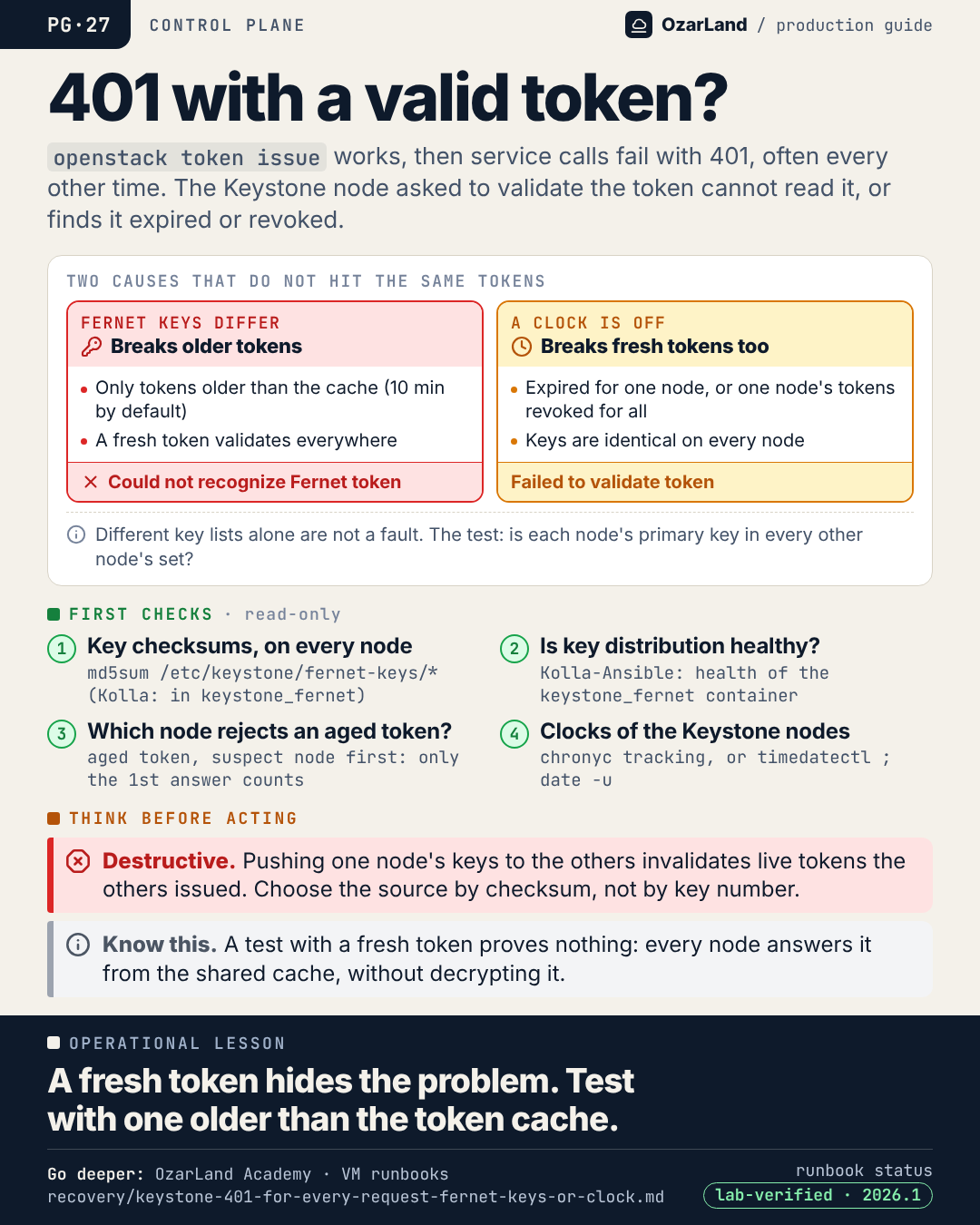
PG-27 · 401 with a token that should be valid: the fresh token is lying to you
Image: dist/pg-27-401-with-a-valid-token.png
openstack token issue works. But a script that keeps its token starts getting 401: sometimes every call, sometimes every other one.

Behind a load balancer, that means a Keystone node cannot validate tokens another one issued. Two usual reasons, and they do not hit the same tokens:

→ Fernet keys differ between nodes: it breaks tokens older than the token cache, 10 minutes by default. Long-running clients, scripts, Horizon sessions.
→ A clock is off on one node: it breaks fresh tokens too.

Here is the trap. On Kolla-Ansible, Keystone caches every token it issues in memcached, shared by all nodes. For 10 minutes, any node answers from the cache, without decrypting anything. So your test with a brand new token passes on every node, with diverged keys.

Test with a token older than the cache. And compare key checksums across nodes, not key numbers.

Runbook: https://github.com/OzarLand/ozarland-academy/blob/main/docs/runbooks/recovery/keystone-401-for-every-request-fernet-keys-or-clock.md
More memos: https://github.com/OzarLand/ozarland-academy/tree/main/docs/production

#OpenStack #Keystone #Authentication #ControlPlane #CloudOperations #OzarLand
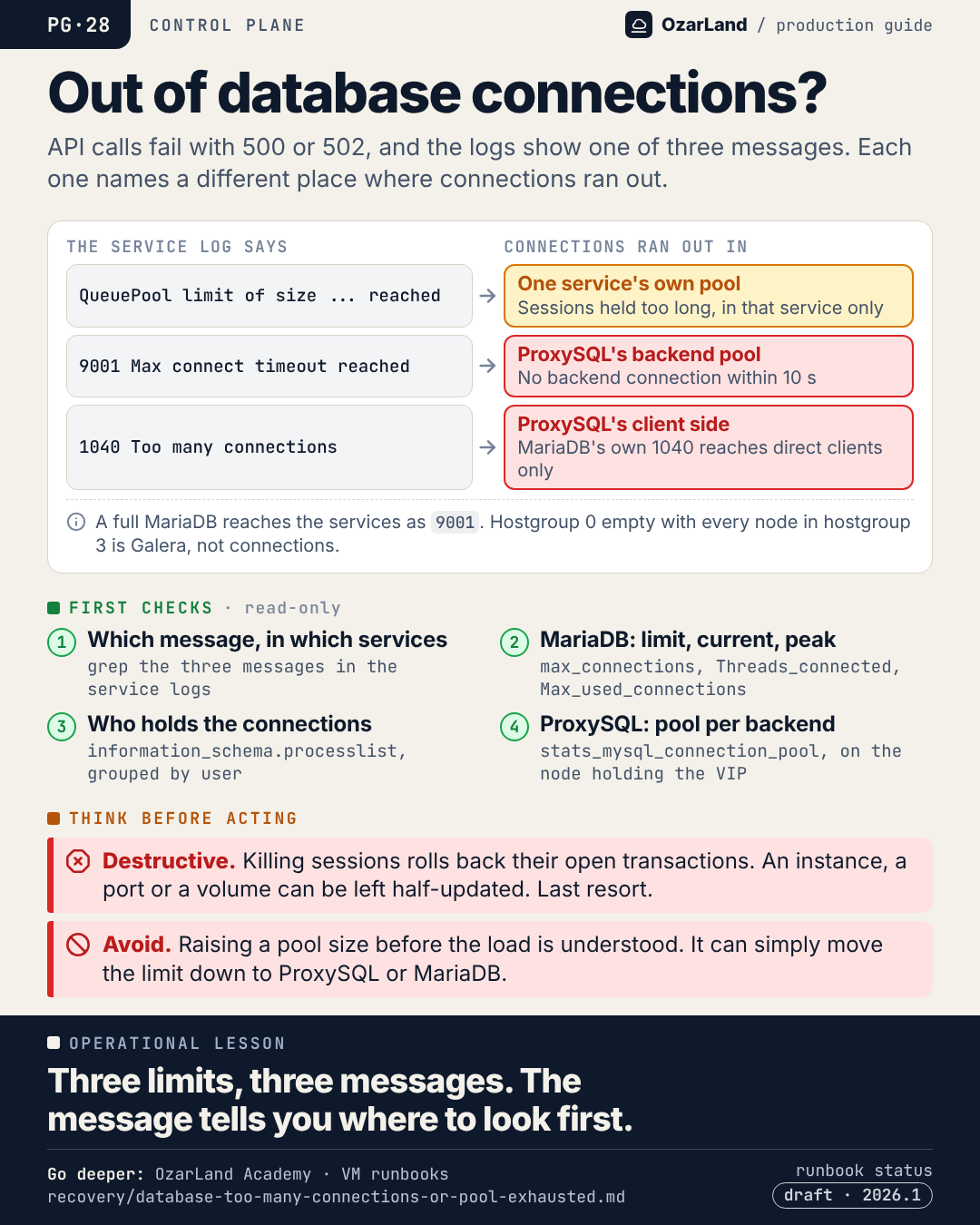
PG-28 · "Too many connections": three limits, three messages
Image: dist/pg-28-database-connections-exhausted.png
API calls fail with 500. The logs talk about database connections. The reflex is to raise a limit somewhere.

With MariaDB behind ProxySQL, there are three places where connections can run out, and each has its own message:

→ "QueuePool limit of size ... reached": the SQLAlchemy pool inside one service. The database is fine. That service holds its sessions too long.
→ "9001 Max connect timeout reached": ProxySQL could not get a backend connection in time.
→ "1040 Too many connections": ProxySQL's client side. A full MariaDB shows up in the services as 9001.

Read the message before touching a setting. A larger pool per process, multiplied by the number of processes and controllers, can simply move the limit one layer down.

And one false friend: 9001 with the writer hostgroup empty and every node offline is a Galera problem, not a connection problem.

Source runbook status: draft.

Runbook: https://github.com/OzarLand/ozarland-academy/blob/main/docs/runbooks/recovery/database-too-many-connections-or-pool-exhausted.md
More memos: https://github.com/OzarLand/ozarland-academy/tree/main/docs/production

#OpenStack #MariaDB #ProxySQL #ControlPlane #CloudOperations #OzarLand
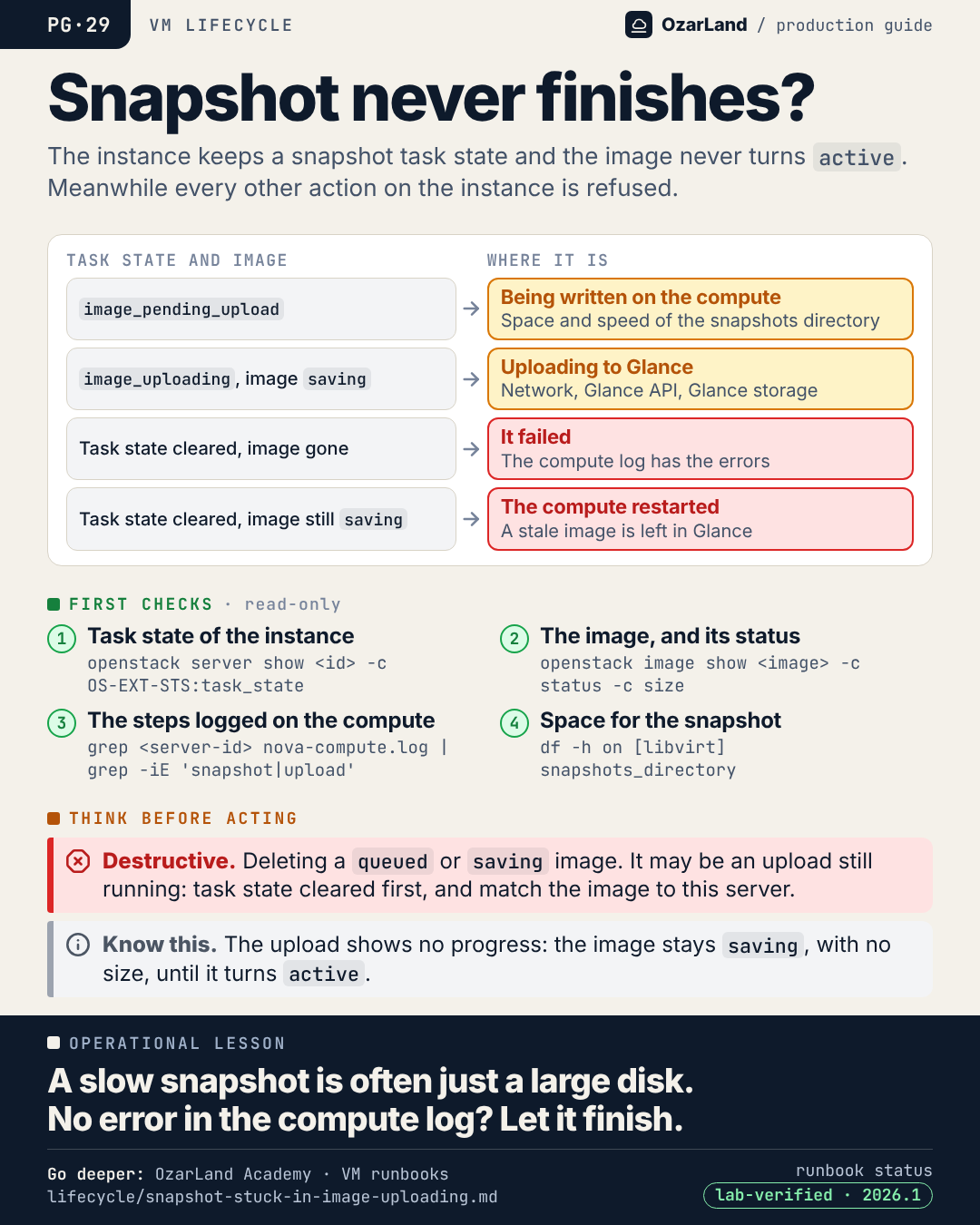
PG-29 · A snapshot that never finishes: find where it is before you clear it
Image: dist/pg-29-snapshot-never-finishes.png
An instance snapshot has been running for an hour. The image is still "saving". Every other action on the instance is refused. Is it stuck?

Often not. On the standard path, the whole disk is first written on the compute, then uploaded to Glance, and the upload has no progress indicator at all: the image stays "saving", with no size, until the moment it turns active.

The task state tells you where it is:
→ image_pending_upload: being written on the compute
→ image_uploading with the image "saving": on its way to Glance
→ task state cleared and image gone: it failed, and the compute log says why
→ task state cleared and the image still "saving": the compute restarted, and left a stale image behind

The dangerous shortcut is deleting a "saving" image that turns out to be someone else's upload.

Runbook: https://github.com/OzarLand/ozarland-academy/blob/main/docs/runbooks/lifecycle/snapshot-stuck-in-image-uploading.md
More memos: https://github.com/OzarLand/ozarland-academy/tree/main/docs/production

#OpenStack #Nova #Glance #CloudOperations #SRE #OzarLand
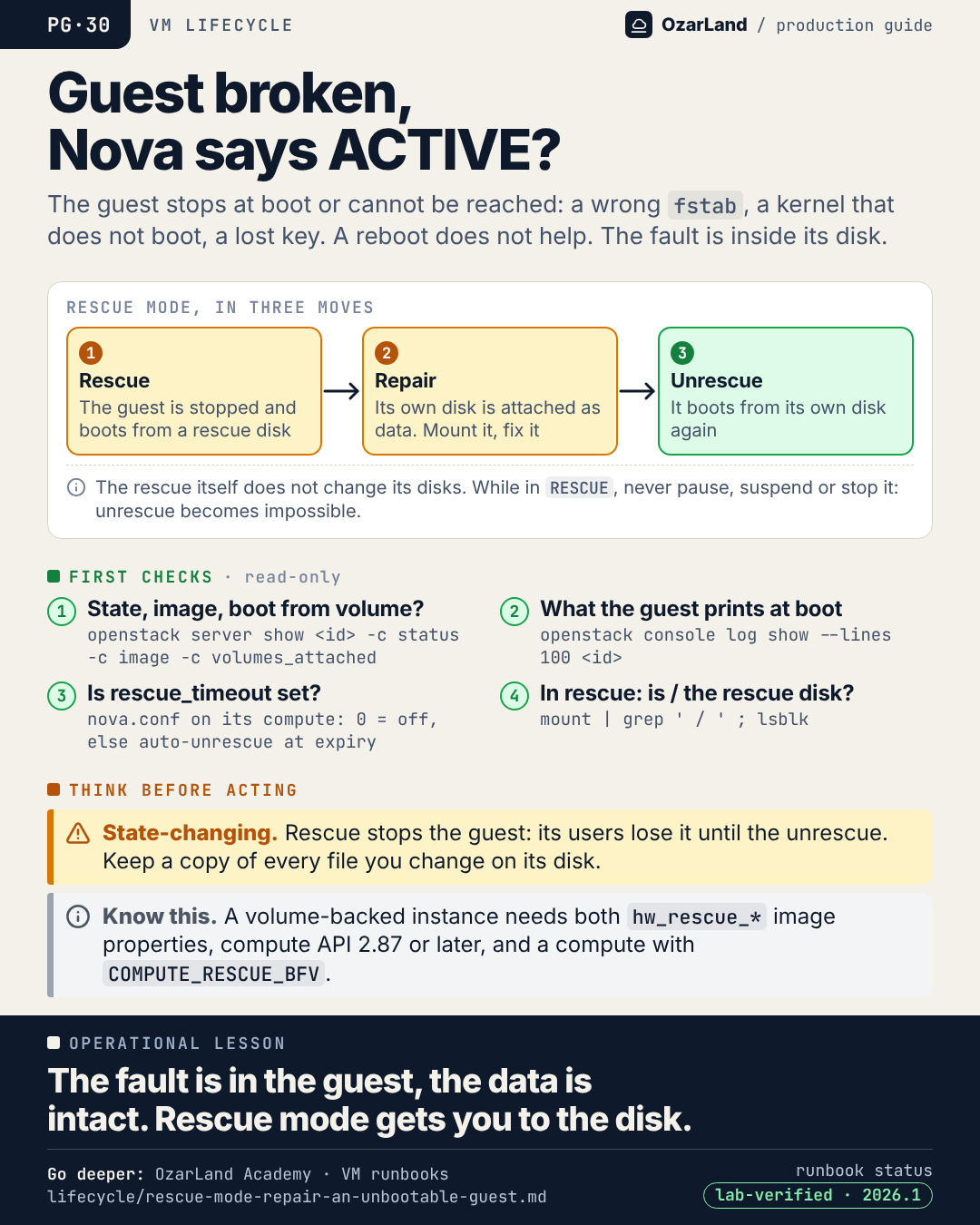
PG-30 · The guest is broken, Nova says ACTIVE: rescue mode
Image: dist/pg-30-guest-broken-nova-says-active.png
Nova shows the instance ACTIVE. The guest is stuck in an emergency shell after a wrong fstab line. Or it boots, and nobody can log in any more.

A reboot will not help: the fault is inside the guest's disk. And from Nova's point of view, nothing is wrong.

Rescue mode is the way in, in three moves:
1. Rescue: the guest is stopped and boots from a rescue disk
2. Repair: its own disk is attached as a data disk. Mount it, fix the file.
3. Unrescue: it boots from its own disk again

Two things to check before starting. Whether rescue_timeout is set on the compute: if it is, Nova unrescues without warning, possibly with the disk still mounted. And whether the instance boots from a volume: that needs a rescue image with the hw_rescue properties.

Runbook: https://github.com/OzarLand/ozarland-academy/blob/main/docs/runbooks/lifecycle/rescue-mode-repair-an-unbootable-guest.md
More memos: https://github.com/OzarLand/ozarland-academy/tree/main/docs/production

#OpenStack #Nova #Troubleshooting #CloudOperations #SRE #OzarLand
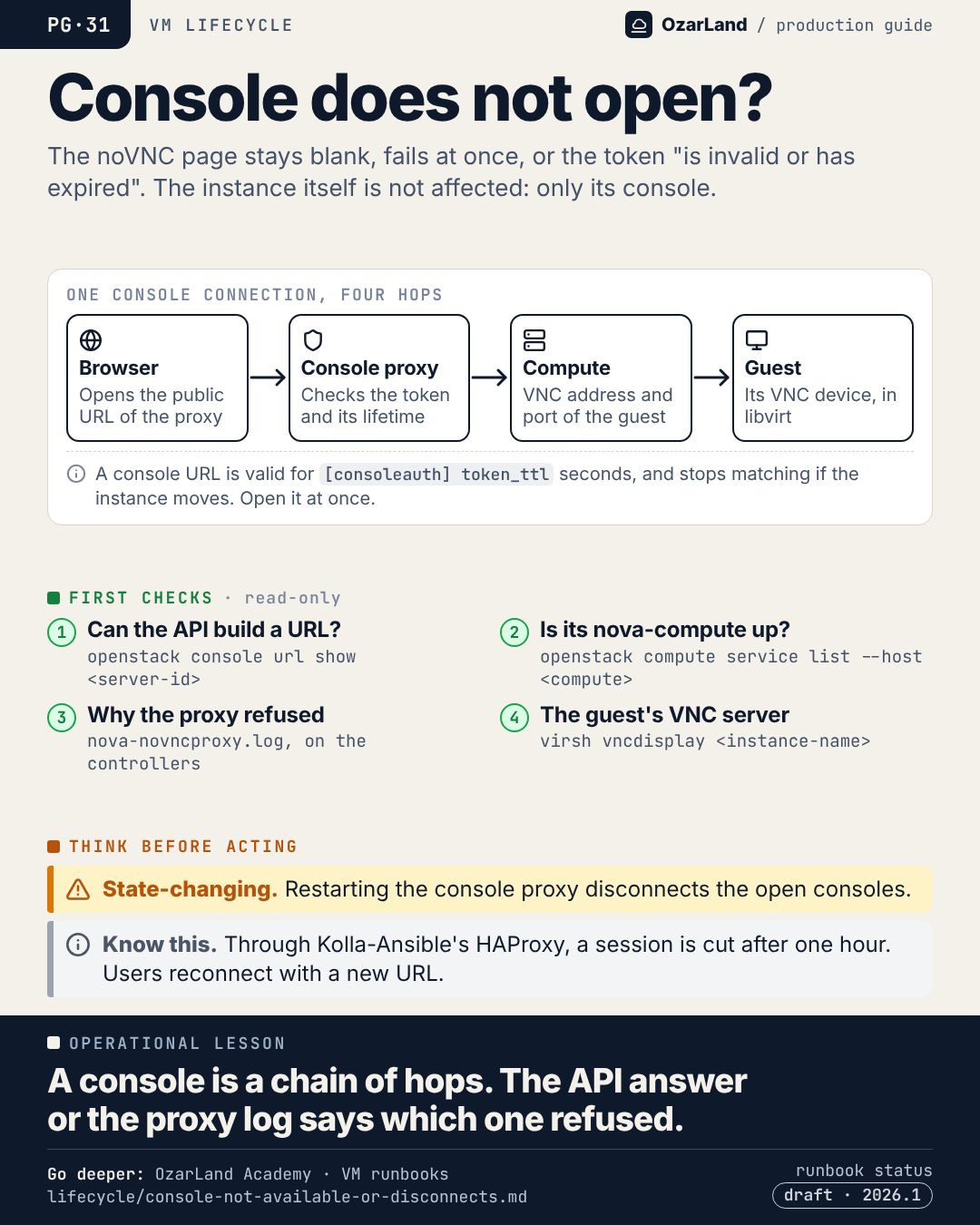
PG-31 · The instance console does not open: four hops, two places to look
Image: dist/pg-31-console-does-not-open.png
"The console doesn't work." It is one of the vaguest tickets an OpenStack team gets, and usually nothing is wrong with the instance.

A console connection is a chain of four hops:
→ the browser opens the public URL of the console proxy
→ the proxy checks the token, and its lifetime
→ the proxy connects to the compute, on the guest's VNC port
→ the guest's own VNC device, in libvirt

Each one fails differently: a blank page, an Origin error, "the token is invalid or has expired", a connection refused. The API's answer, then the console proxy log, tell you which hop refused.

Start with the most boring cause: a URL opened too late, or reused.

Source runbook status: draft.

Runbook: https://github.com/OzarLand/ozarland-academy/blob/main/docs/runbooks/lifecycle/console-not-available-or-disconnects.md
More memos: https://github.com/OzarLand/ozarland-academy/tree/main/docs/production

#OpenStack #Nova #Troubleshooting #CloudOperations #SRE #OzarLand
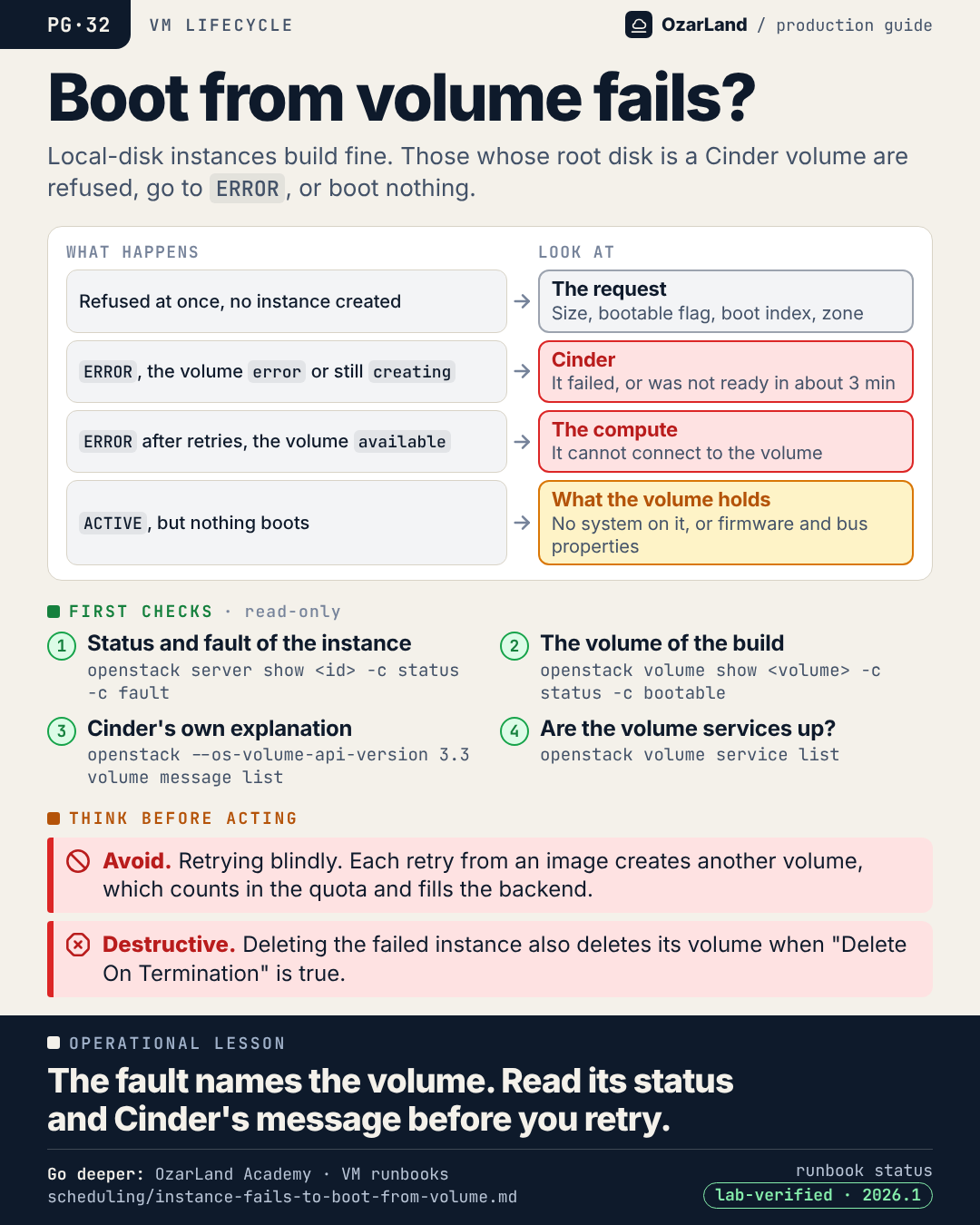
PG-32 · Boot from volume fails: Nova reports it, Cinder explains it
Image: dist/pg-32-boot-from-volume-fails.png
Instances with a local disk build fine. The ones that boot from a volume do not.

What happens tells you where to look:
→ refused at once, no instance: the request itself. Volume smaller than the image's min_disk, a volume that is not bootable, no boot index 0.
→ ERROR, the volume in "error" or still "creating": Cinder. It failed, or the volume was not ready when Nova stopped waiting, after about three minutes by default.
→ ERROR with "Exceeded maximum number of retries", the volume "available": the compute. It could not connect to the volume, and neither could the others.
→ ACTIVE, but nothing boots: what the volume holds. A blank volume marked bootable, or an image that needs a firmware or disk bus the instance did not get.

For a volume in error, Cinder usually says why in one line: openstack volume message list.

What not to do: retry in a loop. Each retry from an image creates another volume, which counts in the quota.

Runbook: https://github.com/OzarLand/ozarland-academy/blob/main/docs/runbooks/scheduling/instance-fails-to-boot-from-volume.md
More memos: https://github.com/OzarLand/ozarland-academy/tree/main/docs/production

#OpenStack #Nova #Cinder #Storage #CloudOperations #OzarLand
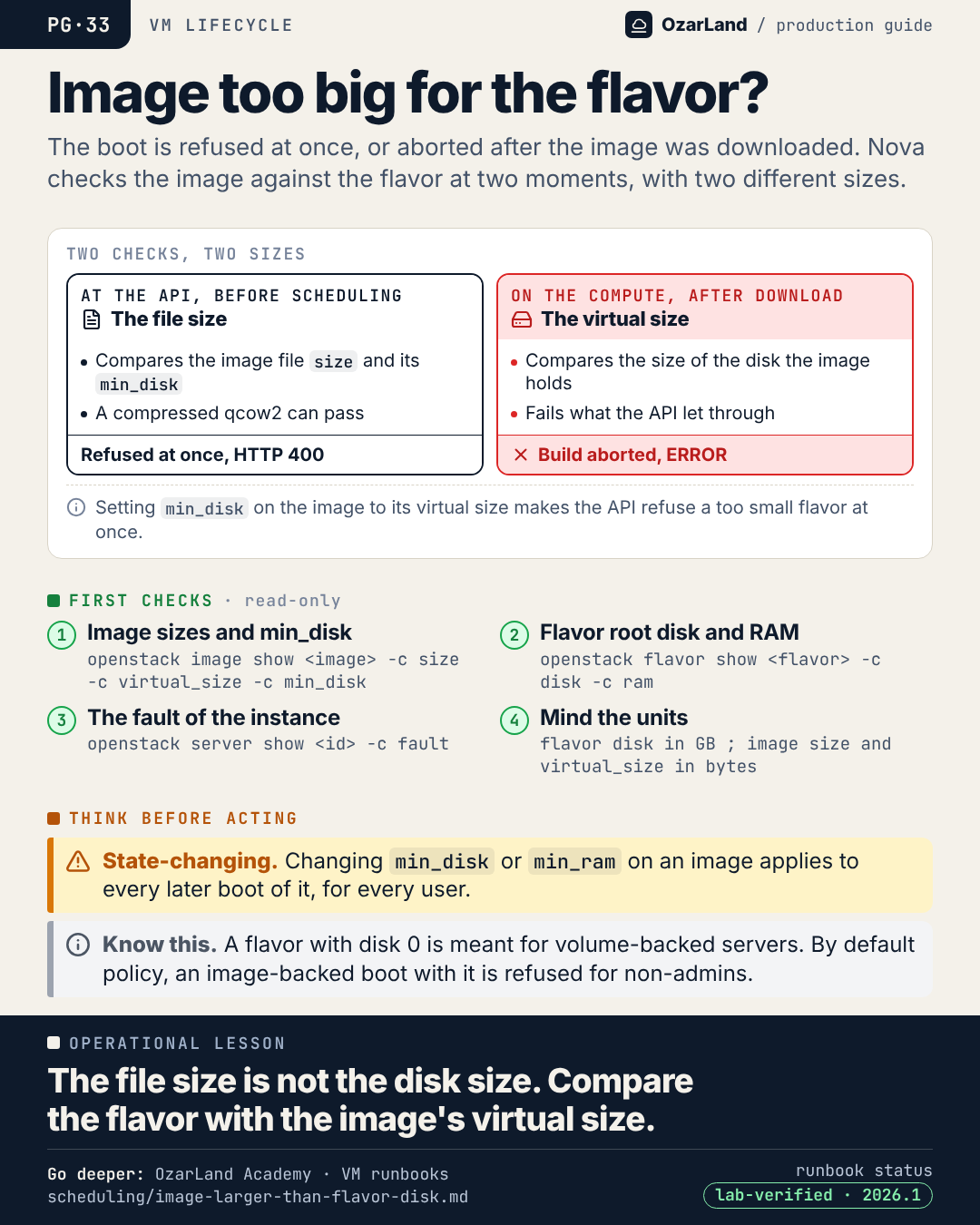
PG-33 · Flavor's disk is too small: the file size is not the disk size
Image: dist/pg-33-image-too-big-for-the-flavor.png
A flavor too small for an image. Sometimes the boot is refused at once. Sometimes the instance is scheduled, the image is downloaded, and the build is aborted. The difference is on the image.

Nova checks the image against the flavor twice, with two different numbers:
→ at the API, before scheduling: the size of the image FILE, and its min_disk
→ on the compute, after the download: the VIRTUAL size, the disk the image actually holds

A compressed qcow2 has a small file and a large virtual disk. With no min_disk set, it passes the first check and fails the second, after wasting a scheduling round and a download.

The clean fix is on the image: set min_disk to its virtual size, and the API refuses a too small flavor immediately, with a clear message.

Runbook: https://github.com/OzarLand/ozarland-academy/blob/main/docs/runbooks/scheduling/image-larger-than-flavor-disk.md
More memos: https://github.com/OzarLand/ozarland-academy/tree/main/docs/production

#OpenStack #Nova #Glance #CloudOperations #SRE #OzarLand
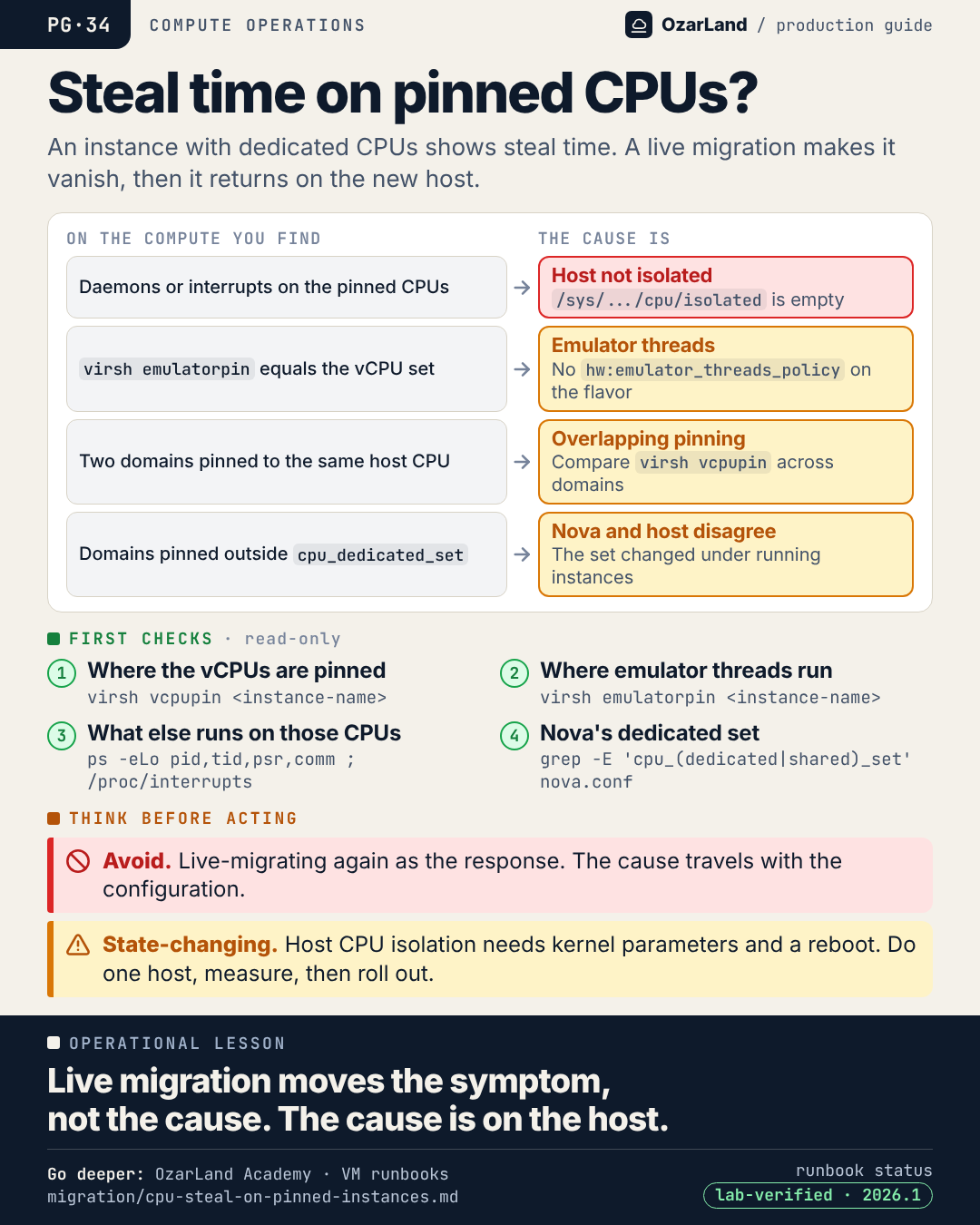
PG-34 · Steal time on pinned CPUs: live migration is not the fix
Image: dist/pg-34-steal-time-on-pinned-cpus.png
An instance was created with dedicated CPUs. It should never see steal time: each vCPU owns a host CPU. And yet top shows 7% steal, and the latency-sensitive workload reports jitter.

Someone live-migrates it. Steal drops to zero. Problem solved.

It comes back days or weeks later on the new host. So it gets migrated again. And again.

Live migration moves the symptom, not the cause. The cause is on the host, and it travels with the configuration:
→ daemons or interrupts running on the pinned CPUs: the host is not isolated
→ emulator threads sharing the vCPU set
→ two instances pinned to the same host CPU
→ domains pinned outside the set Nova believes is dedicated

All of them are visible from the compute, read-only, with virsh vcpupin, virsh emulatorpin and a look at what else runs on those CPUs.

Runbook: https://github.com/OzarLand/ozarland-academy/blob/main/docs/runbooks/migration/cpu-steal-on-pinned-instances.md
More memos: https://github.com/OzarLand/ozarland-academy/tree/main/docs/production

#OpenStack #Nova #Performance #NFV #CloudOperations #OzarLand
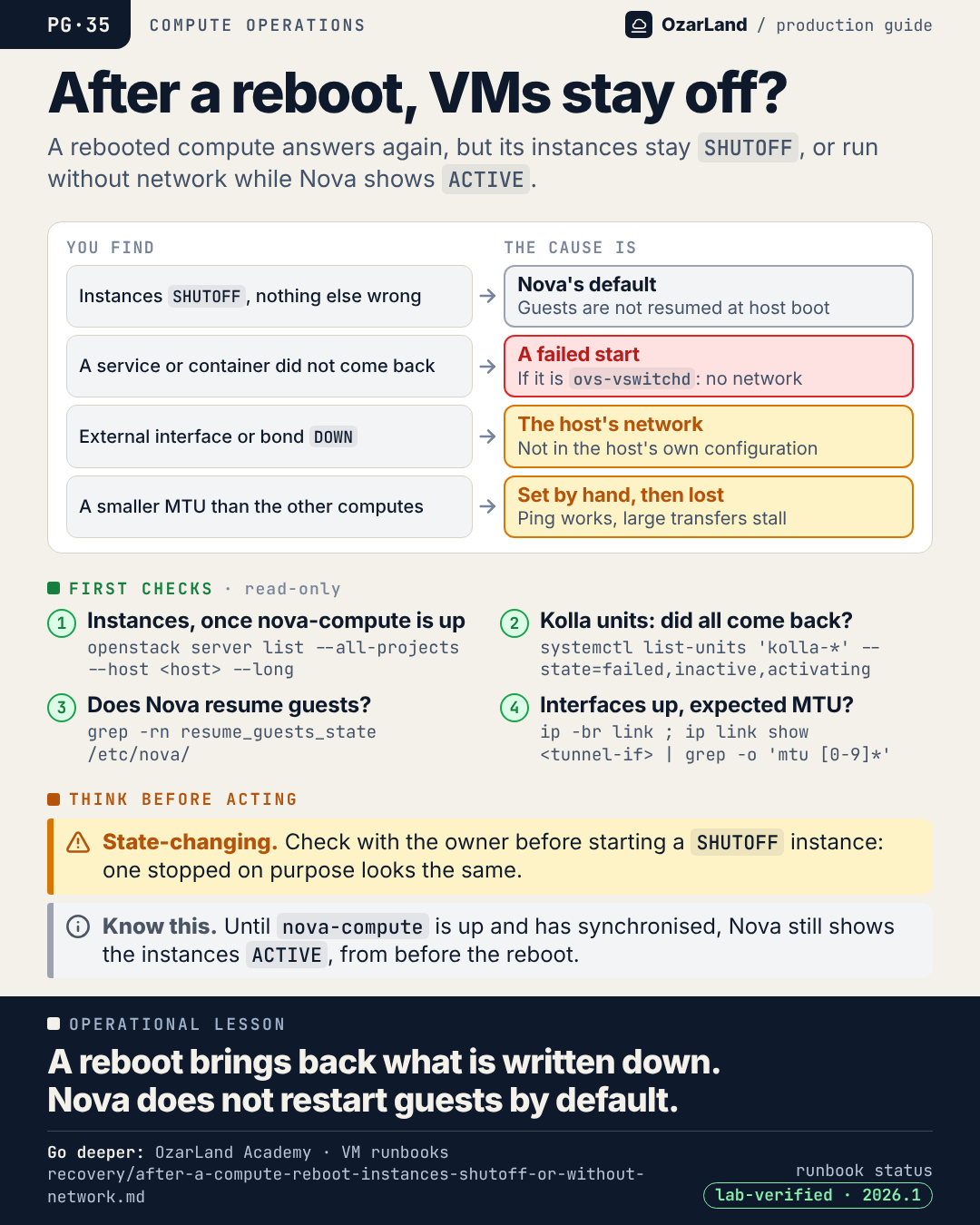
PG-35 · After a compute reboot, the instances stay SHUTOFF. That is the default.
Image: dist/pg-35-after-a-compute-reboot.png
A compute was rebooted for a kernel update. It is back, it answers SSH, nova-compute is up. And every instance on it is SHUTOFF.

Nothing is broken. resume_guests_state_on_host_boot defaults to False: Nova does not start the guests that were running before a host reboot. Someone has to.

The other surprises after a reboot come from the same place: what was never written down.
→ a service that did not come back, and if it is ovs-vswitchd, every instance is cut off
→ an external interface or bond that is DOWN
→ an MTU that was set by hand, months ago, and is back to the default

One caution before starting everything again: an instance that was stopped on purpose before the reboot looks exactly like the others.

Runbook: https://github.com/OzarLand/ozarland-academy/blob/main/docs/runbooks/recovery/after-a-compute-reboot-instances-shutoff-or-without-network.md
More memos: https://github.com/OzarLand/ozarland-academy/tree/main/docs/production

#OpenStack #Nova #Maintenance #CloudOperations #SRE #OzarLand
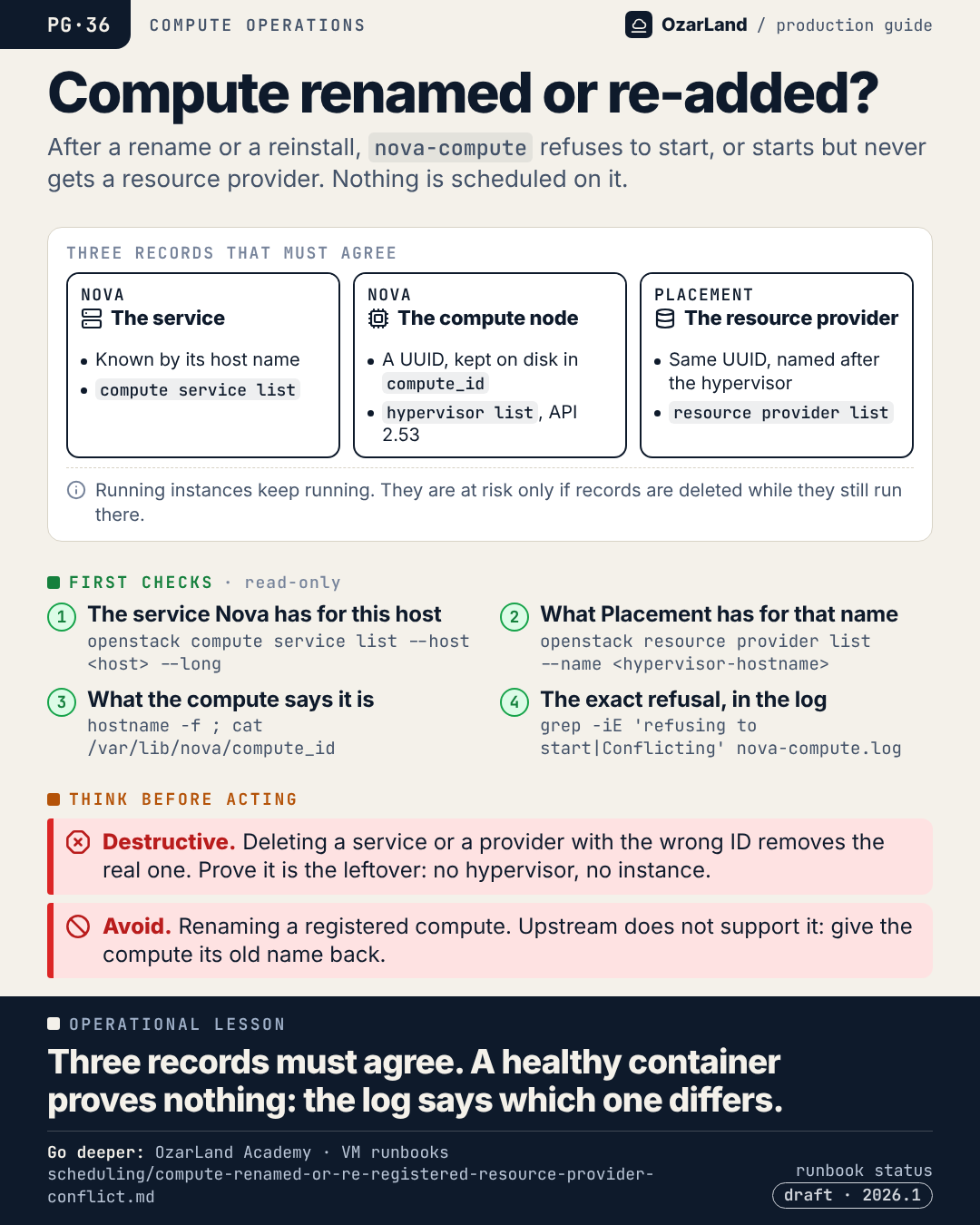
PG-36 · A compute was renamed. Now nova-compute refuses to start.
Image: dist/pg-36-compute-renamed-or-re-added.png
A compute was reinstalled, or its host name went from a short name to an FQDN. Since then, nova-compute refuses to start. Or it starts, shows "up", and no instance ever lands on it.

Nova ties a compute to three records that must agree:
→ the service, known by its host name
→ the compute node, known by a UUID the compute keeps on disk (compute_id)
→ the Placement resource provider, same UUID, named after the hypervisor

Change the name, lose the file, or leave an old provider behind, and one of them disagrees.

Two things to remember. Read the nova-compute log, not the container status: on a lab the container stayed "healthy" while the service was down. And do not fix it by deleting records while instances still run on that host.

Source runbook status: draft.

Runbook: https://github.com/OzarLand/ozarland-academy/blob/main/docs/runbooks/scheduling/compute-renamed-or-re-registered-resource-provider-conflict.md
More memos: https://github.com/OzarLand/ozarland-academy/tree/main/docs/production

#OpenStack #Nova #Placement #CloudOperations #SRE #OzarLand
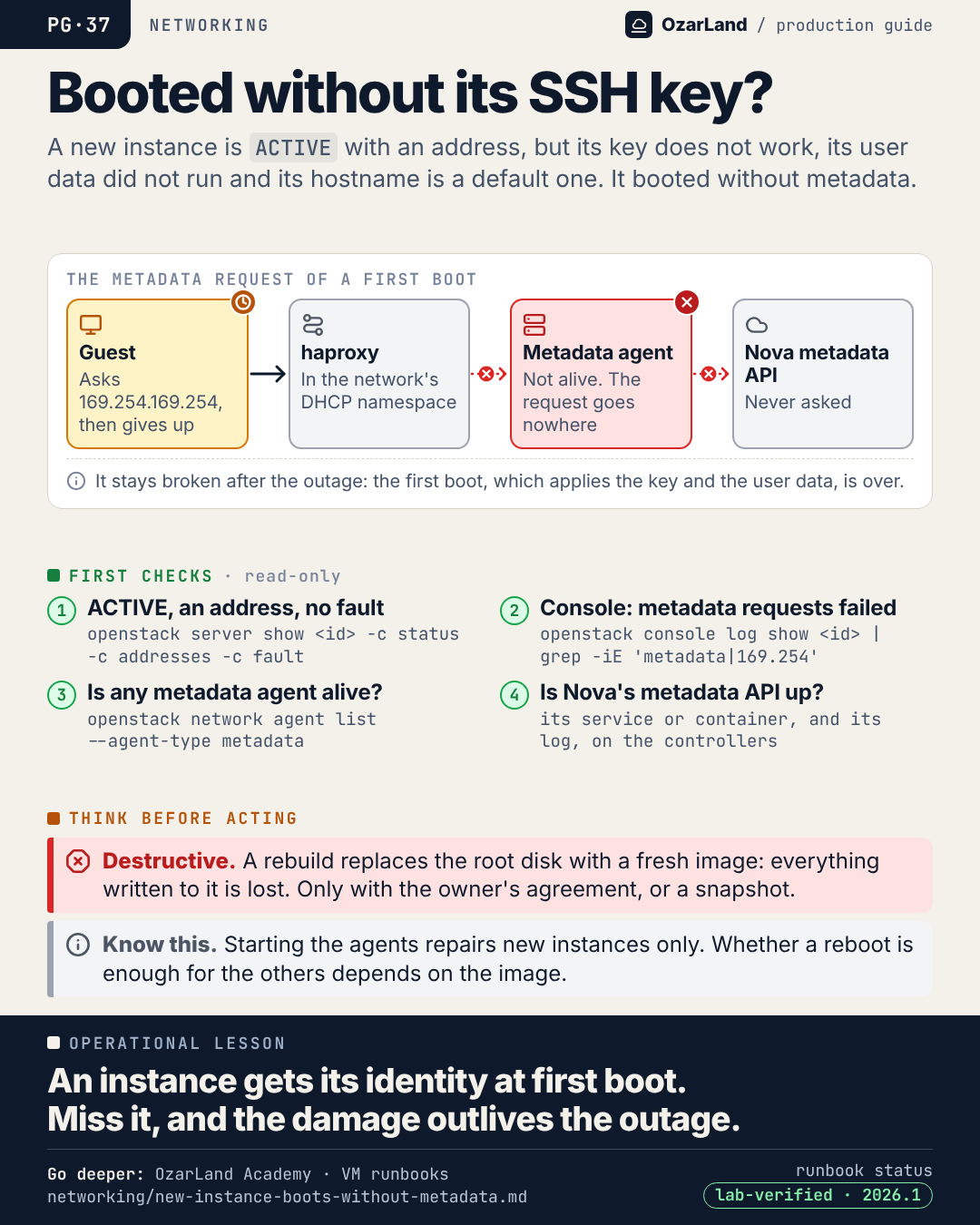
PG-37 · ACTIVE, with an address, and no SSH key: the instance booted without metadata
Image: dist/pg-37-booted-without-its-ssh-key.png
A new instance is ACTIVE. It has its address. And nobody can log in: the SSH key was never installed, the user data never ran, the hostname is a default one.

At first boot, the guest asks 169.254.169.254 for its metadata. On a Kolla-Ansible ML2/OVS platform that request goes through a haproxy in the network's DHCP namespace, then the Neutron metadata agent, then Nova's metadata API. With every metadata agent down, it goes nowhere. The image waits, then boots without it.

Nova reports nothing. Instances created earlier are fine.

The part that hurts: it stays broken after the agents are back. The first boot, the one that applies the key and the user data, is over. Every instance created during the outage has to be dealt with, one by one: a reboot is enough for some images, others need a rebuild.

Runbook: https://github.com/OzarLand/ozarland-academy/blob/main/docs/runbooks/networking/new-instance-boots-without-metadata.md
More memos: https://github.com/OzarLand/ozarland-academy/tree/main/docs/production

#OpenStack #Neutron #Nova #CloudInit #CloudOperations #OzarLand
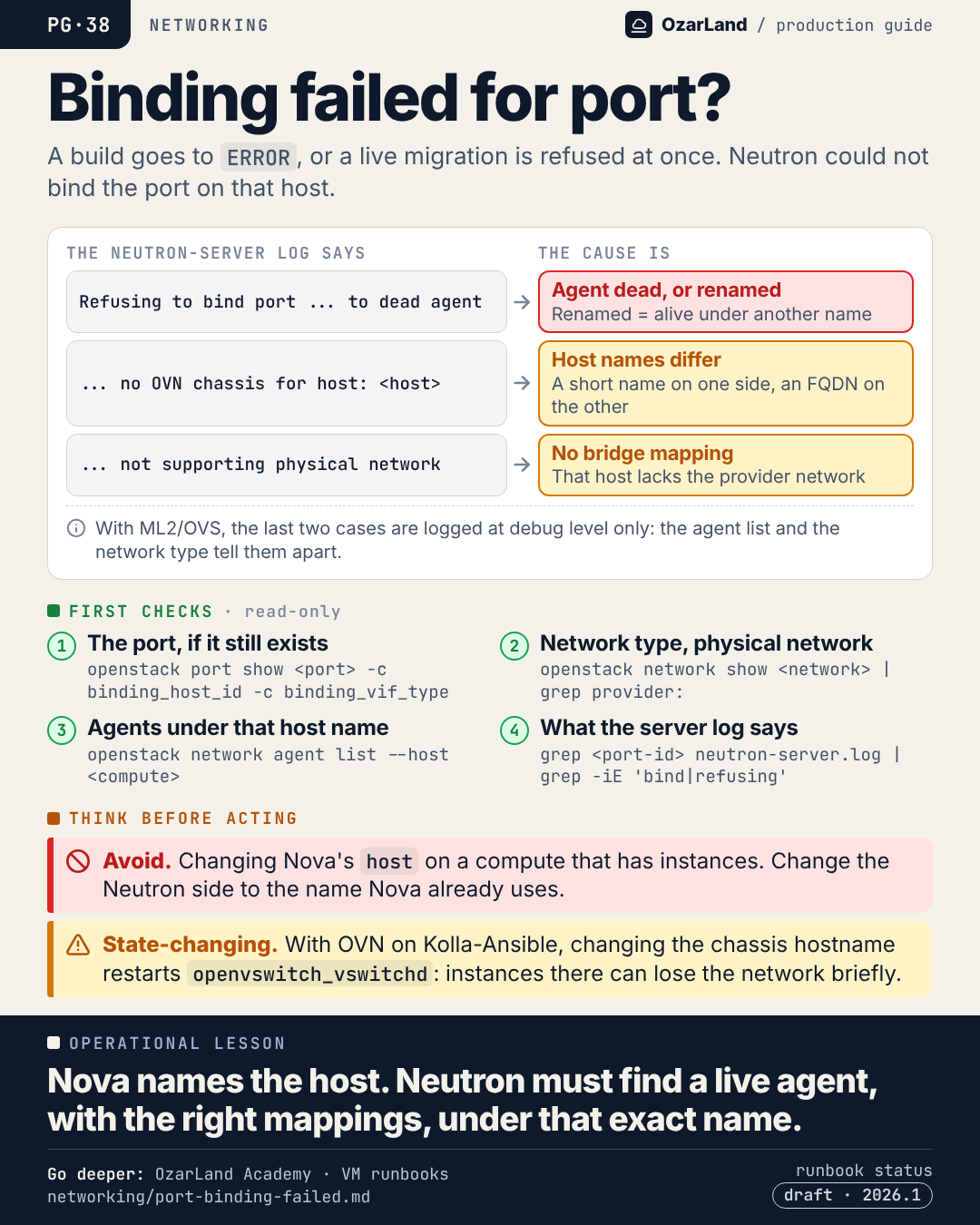
PG-38 · "Binding failed for port": start with the Neutron server log
Image: dist/pg-38-binding-failed-for-port.png
A build ends in ERROR with "Binding failed for port <id>, please check neutron logs for more information." Or a live migration is refused before it starts, sometimes as "No valid host".

For once the message points the right way: start with the Neutron server log, for that port ID.

When Nova allocates or moves a port, it gives Neutron a host name. Neutron then asks each mechanism driver to bind the port on that host. Three usual refusals:
→ the agent on that host is dead, or was renamed and is alive under another name
→ no agent or chassis is registered under that exact name: a short name on one side, an FQDN on the other
→ the host has no bridge mapping for the network's physical network

With ML2/OVS, the last two are only logged at debug level: the agent list and the network type tell them apart.

One rule when names differ: change the Neutron side, never Nova's host on a compute that has instances.

Source runbook status: draft.

Runbook: https://github.com/OzarLand/ozarland-academy/blob/main/docs/runbooks/networking/port-binding-failed.md
More memos: https://github.com/OzarLand/ozarland-academy/tree/main/docs/production

#OpenStack #Neutron #Nova #Networking #CloudOperations #OzarLand
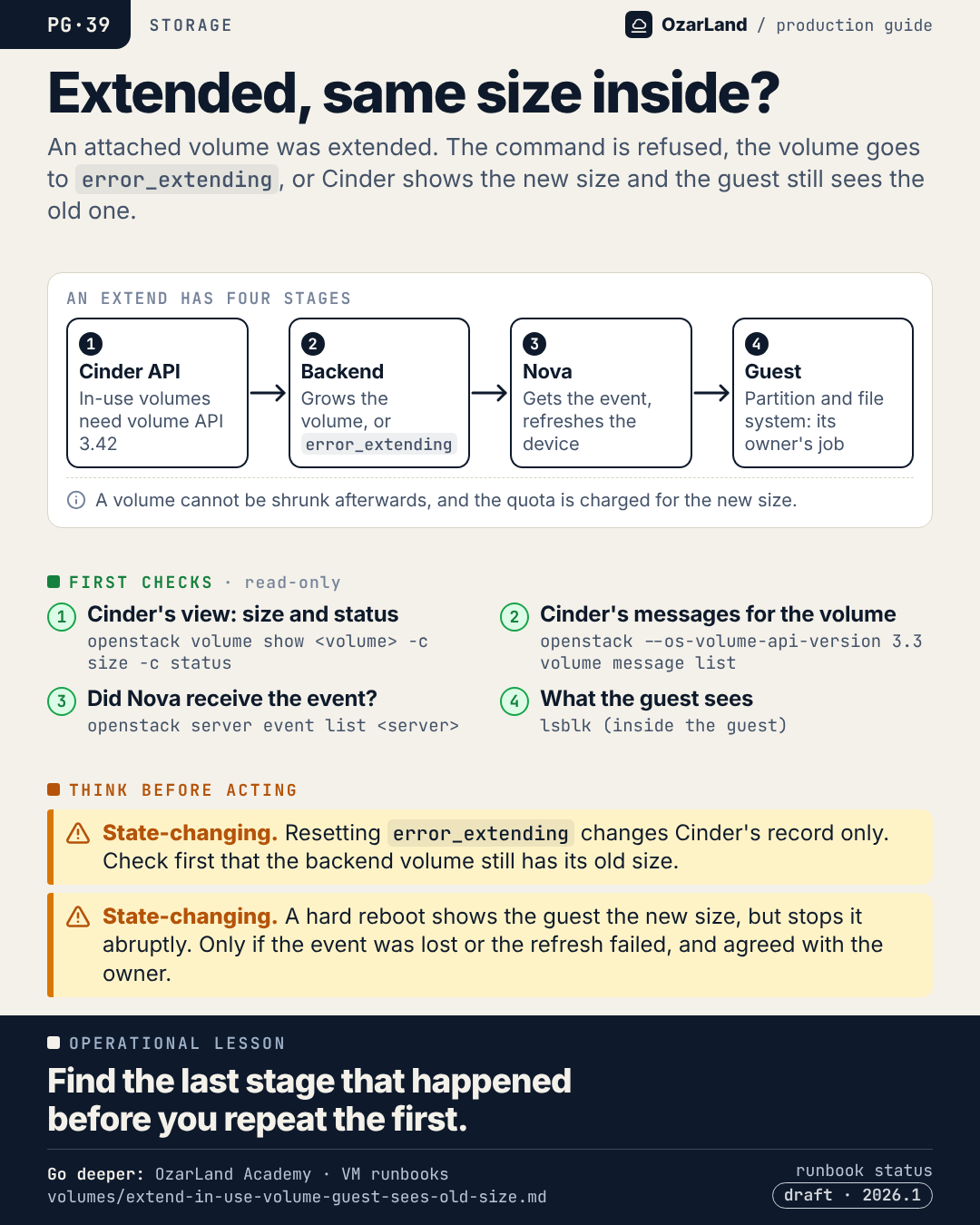
PG-39 · The volume was extended. The guest still sees the old size.
Image: dist/pg-39-extended-but-same-size-inside.png
"I extended the volume and nothing changed." Extending an attached volume is not one operation. It is four stages, and it can stop after any of them:

1. The Cinder API accepts it. For an in-use volume that needs volume API 3.42.
2. The backend grows the volume, or the volume goes to error_extending.
3. Nova receives a volume-extended event and refreshes the device on the compute.
4. Inside the guest, the partition and the file system are grown. That one is the owner's job.

So before extending again, find the last stage that actually happened: Cinder's size and status, Cinder's messages for the volume, the instance's events, and lsblk inside the guest.

And remember that a volume cannot be shrunk afterwards.

Source runbook status: draft.

Runbook: https://github.com/OzarLand/ozarland-academy/blob/main/docs/runbooks/volumes/extend-in-use-volume-guest-sees-old-size.md
More memos: https://github.com/OzarLand/ozarland-academy/tree/main/docs/production

#OpenStack #Cinder #Nova #Storage #CloudOperations #OzarLand
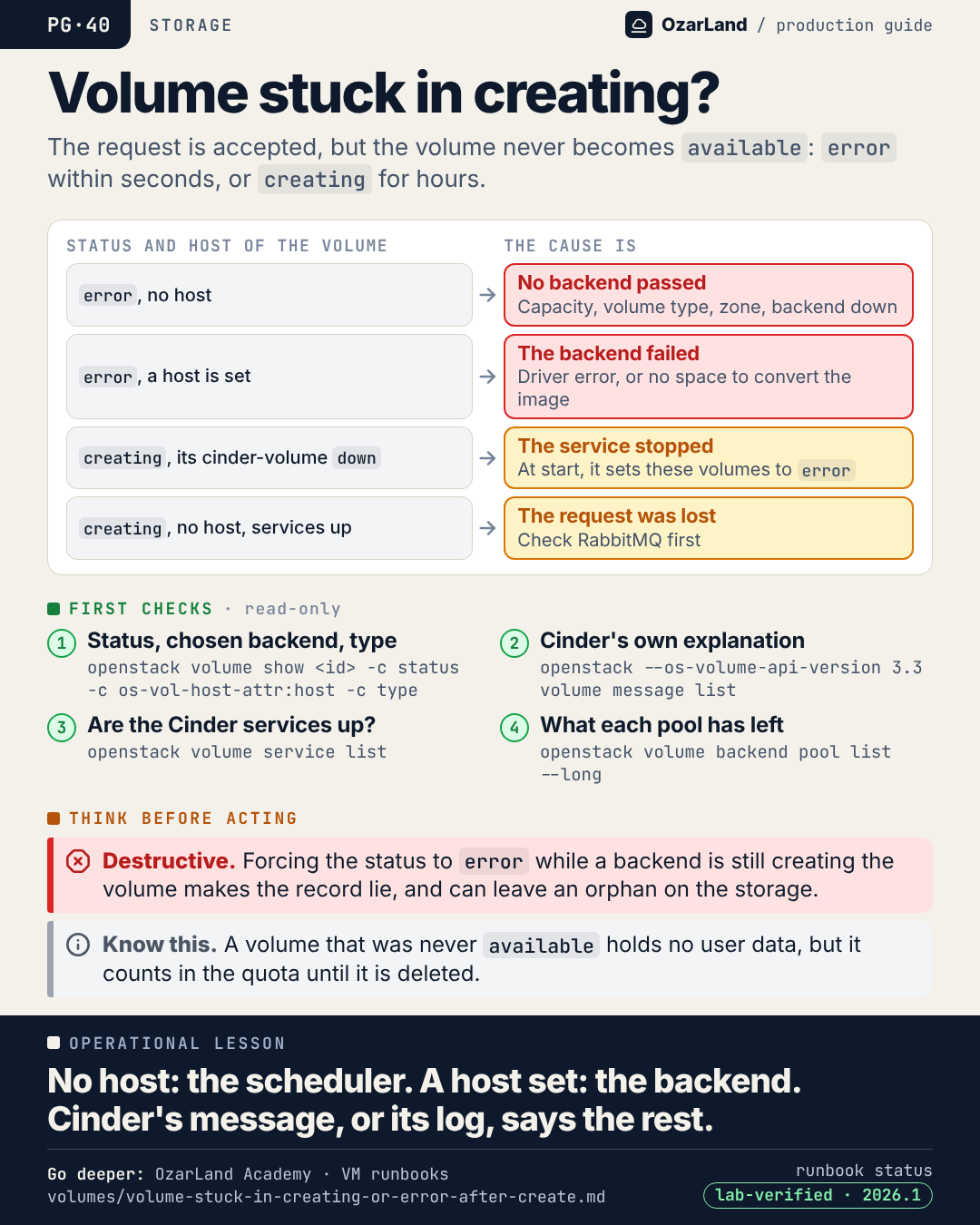
PG-40 · Volume stuck in creating: one field tells the scheduler from the backend
Image: dist/pg-40-volume-stuck-in-creating.png
A volume is created. The request is accepted. And it never becomes available: "error" within seconds, or "creating" for hours.

One field splits the problem in two, the host Cinder chose for the volume:
→ error, no host: no backend passed the scheduler. Capacity, a volume type that matches no backend, the zone, a backend that is down.
→ error, a host is set: the backend was chosen and its driver failed.
→ creating, and that host's cinder-volume is down: the service stopped with the request in hand.
→ creating, no host, every service up: the request was lost. Look at RabbitMQ.

And Cinder often explains itself in one line: openstack --os-volume-api-version 3.3 volume message list.

The shortcut to avoid is forcing the status while a backend is in fact still working on the volume.

Runbook: https://github.com/OzarLand/ozarland-academy/blob/main/docs/runbooks/volumes/volume-stuck-in-creating-or-error-after-create.md
More memos: https://github.com/OzarLand/ozarland-academy/tree/main/docs/production

#OpenStack #Cinder #Storage #CloudOperations #SRE #OzarLand
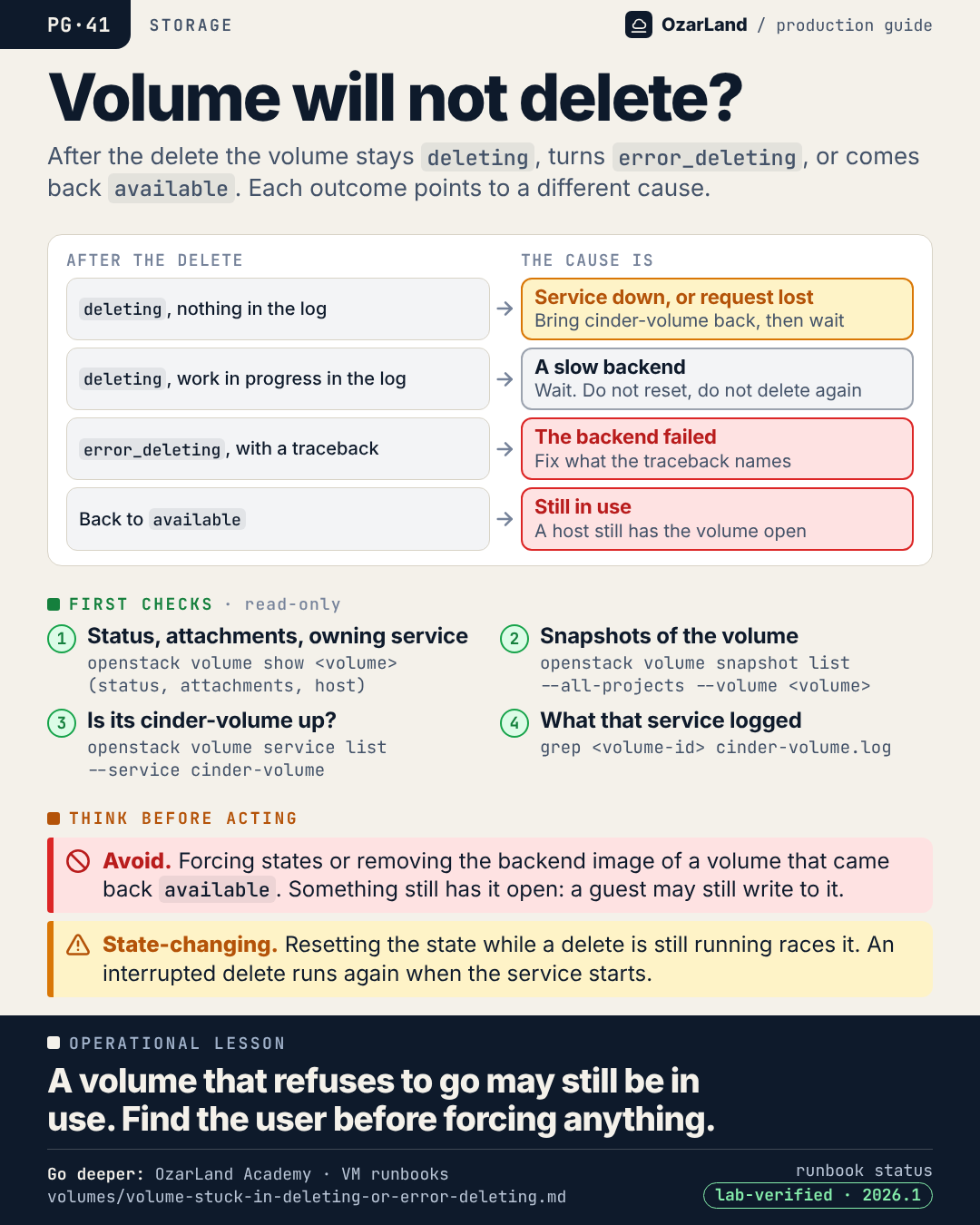
PG-41 · A volume that will not delete may still be in use
Image: dist/pg-41-volume-will-not-delete.png
You delete a volume. It does not go away. What it does instead tells you the cause.

→ It stays "deleting" and the log is silent: the cinder-volume service is down, or the request was lost. Bring the service back, then wait: an interrupted delete is run again at start-up. If nothing happens once it is up, reset the volume to error and delete again.
→ It stays "deleting" and the log shows work in progress: a slow backend. Wait.
→ It turns "error_deleting" with a traceback: the backend failed. Fix what it names.
→ It comes back "available": the backend found the volume still open somewhere.

That last one deserves respect. A volume that refuses to be deleted because something still uses it is the system working correctly. Find the compute and the instance that still has it open before forcing anything.

Runbook: https://github.com/OzarLand/ozarland-academy/blob/main/docs/runbooks/volumes/volume-stuck-in-deleting-or-error-deleting.md
More memos: https://github.com/OzarLand/ozarland-academy/tree/main/docs/production

#OpenStack #Cinder #Storage #DataIntegrity #CloudOperations #OzarLand
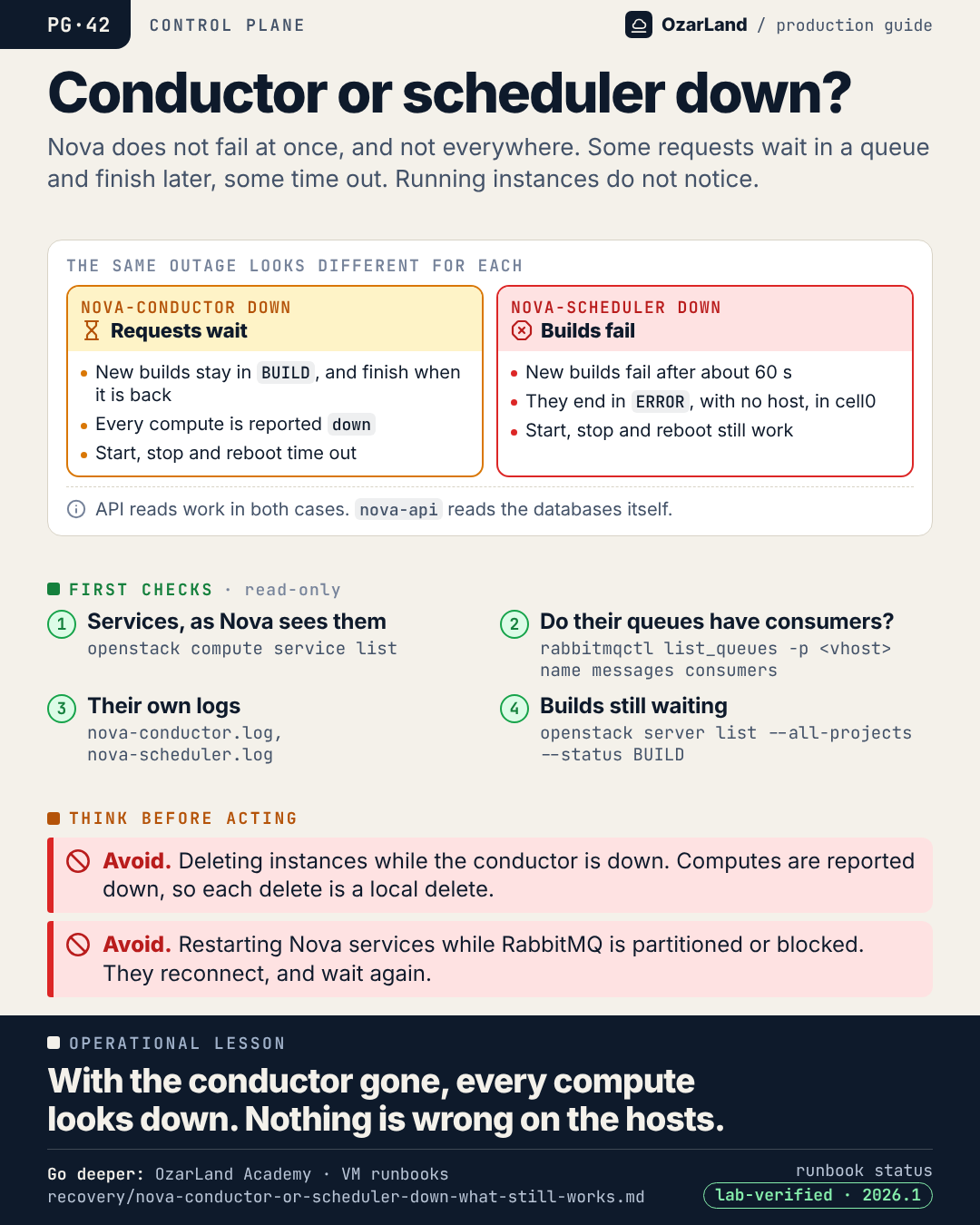
PG-42 · nova-conductor down: every compute looks dead, and none of them is
Image: dist/pg-42-conductor-or-scheduler-down.png
nova-conductor and nova-scheduler live on the controllers. When every copy of one of them is down, Nova does not fail at once, and not everywhere.

With the conductor down:
→ new builds stay in BUILD, and finish by themselves when it is back
→ within a minute every compute is reported "down", while its instances keep running
→ start, stop and reboot time out

With the scheduler down:
→ new builds fail after about a minute, and land in ERROR in cell0, with no host
→ start, stop and reboot still work

In both cases API reads work, and running instances notice nothing.

The trap is the wall of "down" computes. nova-compute has no database access of its own: its heartbeat goes through the conductor. Nothing is wrong on the hosts. And deleting an instance at that moment is a local delete.

Runbook: https://github.com/OzarLand/ozarland-academy/blob/main/docs/runbooks/recovery/nova-conductor-or-scheduler-down-what-still-works.md
More memos: https://github.com/OzarLand/ozarland-academy/tree/main/docs/production

#OpenStack #Nova #ControlPlane #IncidentResponse #CloudOperations #OzarLand
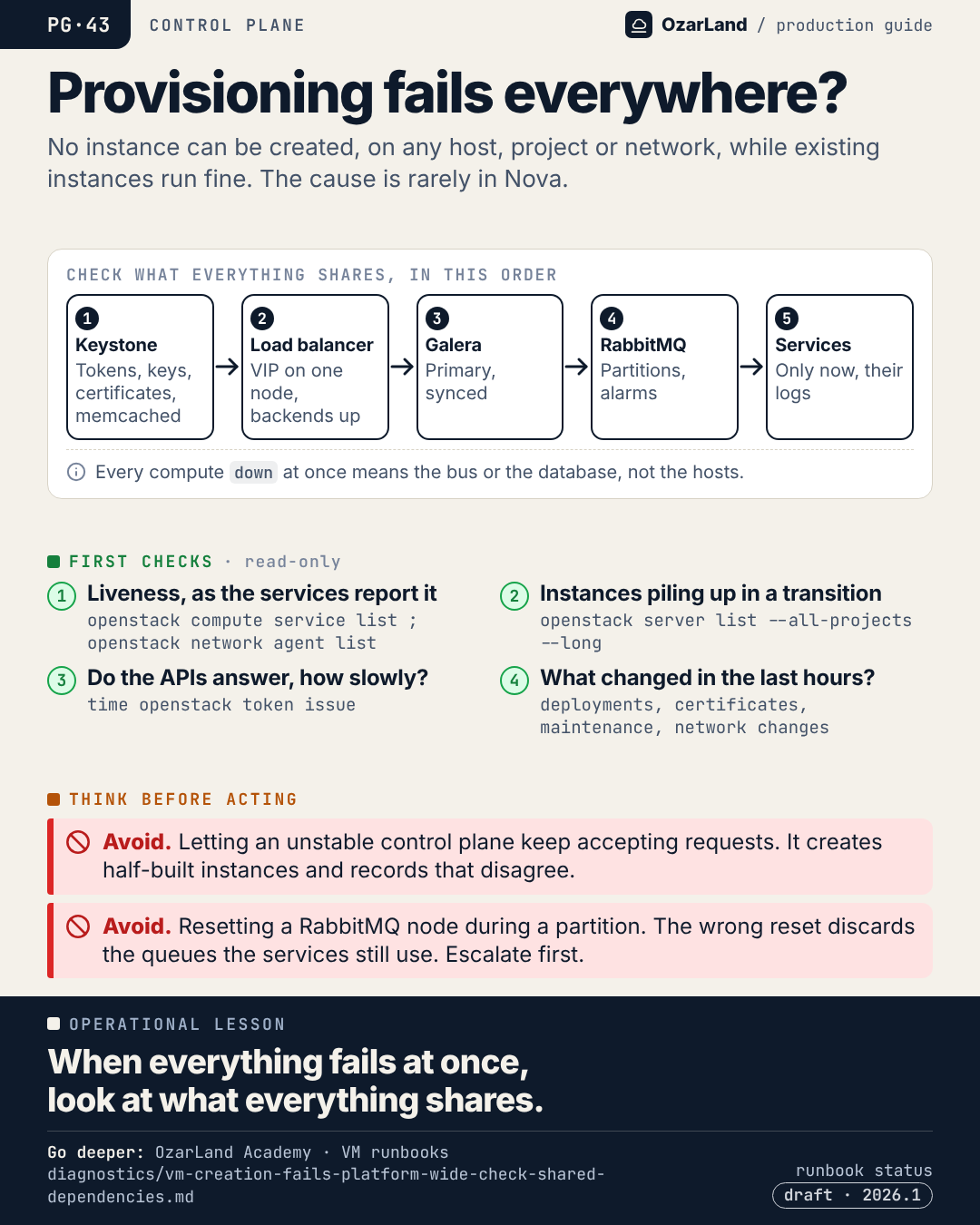
PG-43 · VM creation fails everywhere: the cause is rarely in Nova
Image: dist/pg-43-provisioning-fails-everywhere.png
Nobody can create an instance. Any host, any project, any network. Existing instances run fine.

The reflex is to open the Nova logs. But when every provisioning request fails at once, the cause is rarely in Nova. It is in something every service shares.

Check those first, in dependency order, read-only:
1. Keystone and memcached: tokens, Fernet keys, certificates
2. The load balancer: the VIP on exactly one node, backends up
3. Galera: Primary, synced
4. RabbitMQ: partitions, alarms
5. Only now, the OpenStack services, by request id

And ask the question that resolves more incidents than any metric: what changed in the last hours?

The workloads are not at risk from the condition. They are at risk from an uncontrolled attempt to fix it.

Source runbook status: draft.

Runbook: https://github.com/OzarLand/ozarland-academy/blob/main/docs/runbooks/diagnostics/vm-creation-fails-platform-wide-check-shared-dependencies.md
More memos: https://github.com/OzarLand/ozarland-academy/tree/main/docs/production

#OpenStack #IncidentResponse #ControlPlane #SRE #CloudOperations #OzarLand
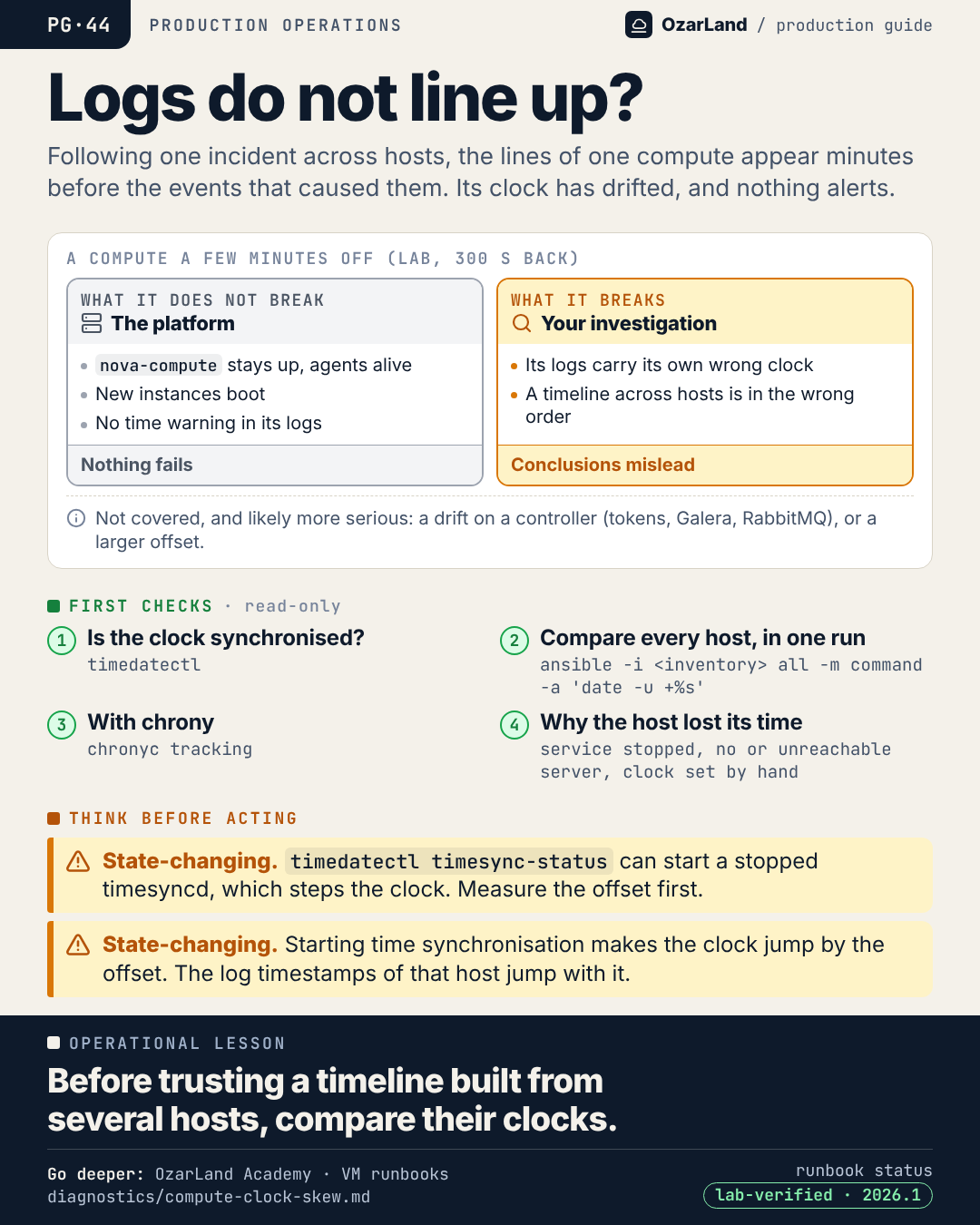
PG-44 · The logs of one host do not line up: check its clock before your theory
Image: dist/pg-44-logs-do-not-line-up.png
You are rebuilding an incident from the logs of several hosts. On one compute, the lines appear minutes before the events that caused them. The story stops making sense.

Before building a theory around it, compare the clocks.

A compute whose clock is a few minutes off keeps working. On a lab, with 300 seconds of drift: nova-compute up, agents alive, new instances booting, no time-related warning in its logs. Nothing fails and nothing alerts. The only thing it breaks is your investigation: its logs carry its own wrong time.

One detail worth knowing: on a host where systemd-timesyncd is only stopped, running timedatectl timesync-status starts it, which steps the clock and erases the offset you wanted to measure. Compare the clocks first.

A drift on a controller is another story, likely a more serious one, and not tested here.

Runbook: https://github.com/OzarLand/ozarland-academy/blob/main/docs/runbooks/diagnostics/compute-clock-skew.md
More memos: https://github.com/OzarLand/ozarland-academy/tree/main/docs/production

#OpenStack #Observability #IncidentResponse #SRE #CloudOperations #OzarLand